
Let ChatGPT Line Up Five Threads Posts Every Morning
Showing up on Threads every day is the hard part. Set up a free workflow once and your AI agent prepares five posts each morning, then waits for your yes before scheduling anything.

You know the morning. You open Threads with nothing ready, tell yourself you'll post after lunch, and then the day's gone. One missed day becomes a missed week, and the account goes quiet just as people were starting to notice you. If you can already write a decent post, showing up every day is the hard part.
Many "always-on" AI agents run on a pile of schedules and burn through usage and money with little to show for it. This routine runs once a day. Each morning your AI agent prepares five Threads posts with Threadify, then stops and waits. You read them, say what to fix and give the go-ahead, and nothing is scheduled until you do. It works from the ChatGPT desktop app, the Claude desktop app or Claude Code.
If you're still deciding which parts of posting to hand off at all, start with what to automate on Threads and what to keep human.
What you need before you start
- A Threadify account with your Threads account connected.
- An agent app: the ChatGPT desktop app, the Claude desktop app or Claude Code.
- Time each morning to read five posts before you approve them. You're the one saying yes, so the routine only works if you actually read them.
How to get five Threads posts ready every morning with your AI agent (7 steps)
Step 1: Connect ChatGPT or Claude to your Threadify account
This connection lets your agent write with Threadify and schedule posts to your Threads account. In Threadify, click the Agent tab at the top of the page, scroll to the bottom and pick the card for the app you use, Claude or ChatGPT. Then follow the steps on that card.
On the Claude card, click Copy to grab Threadify's connector address. In Claude, go to Settings → Connectors → Add custom connector, name it Threadify, paste the address and leave Client ID / Secret blank. Claude opens your browser, where you log in and click Allow. You don't have to copy or manage any keys. If you use ChatGPT, follow the steps on its card instead. For a fuller walkthrough on the Claude side, see how to connect Claude to Threads with Threadify.
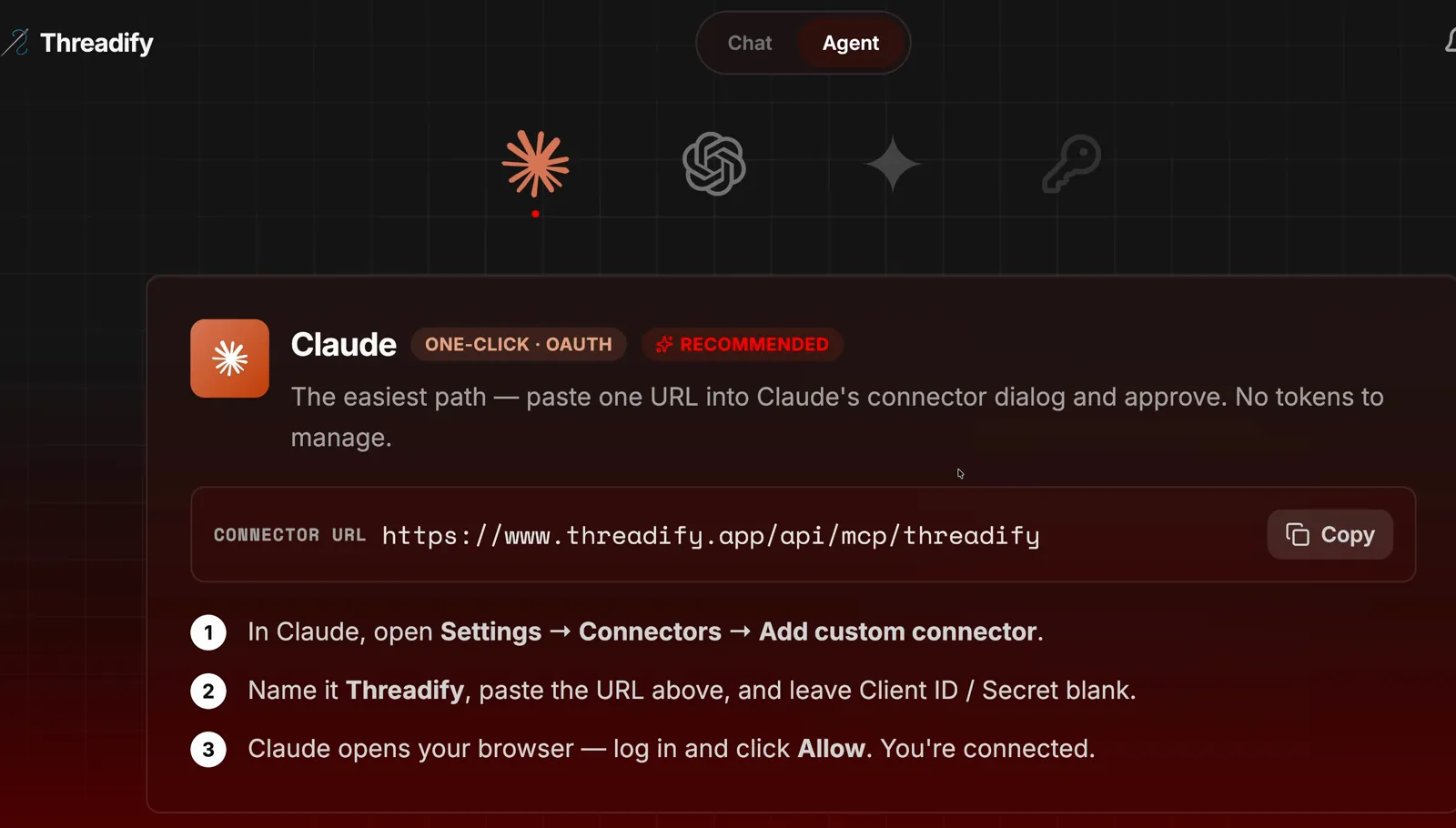
The Agent tab's Claude card, with the Copy button and the numbered steps you follow in Claude.
Step 2: Install the free Run My Threads workflow with one message
The workflow is a set of instructions that teaches your agent this daily routine. Open a new chat in ChatGPT or Claude, paste this in and send it:
https://github.com/lennoxsaint/Threadify-workflows
install this and run the "run my threads" skill
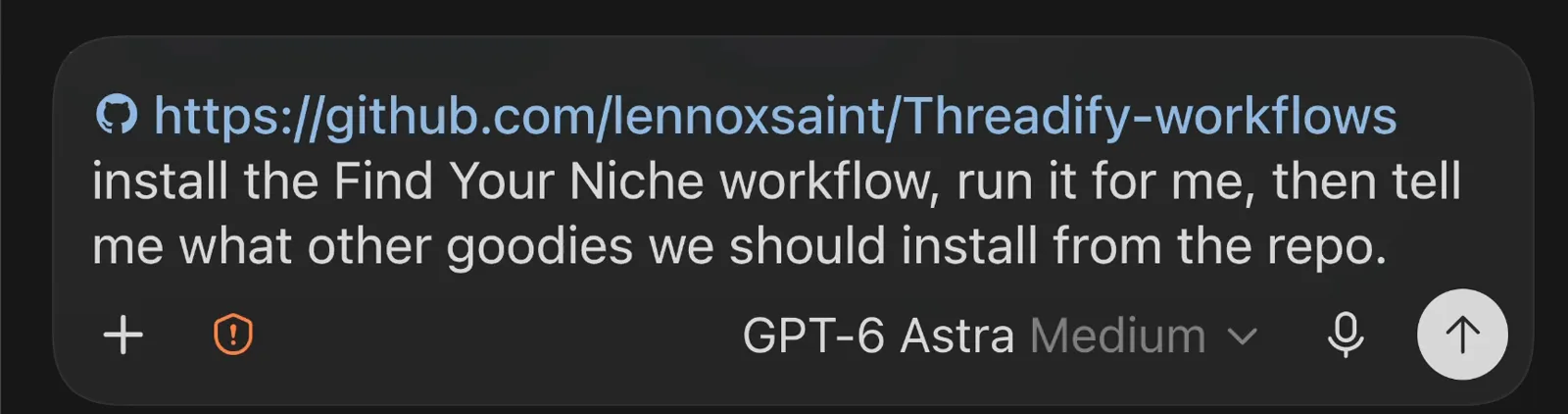
An install message in an agent chat: the free workflows link first, then one plain sentence. This one asks for a different workflow; yours asks for Run My Threads.
Step 3: Start the routine with one short command
Once it's installed, type /run my in the message box. Pick Run My Threads from the suggestion that pops up and press enter. Its description sums up the deal: you approve a planned day of five Threadify posts every morning.
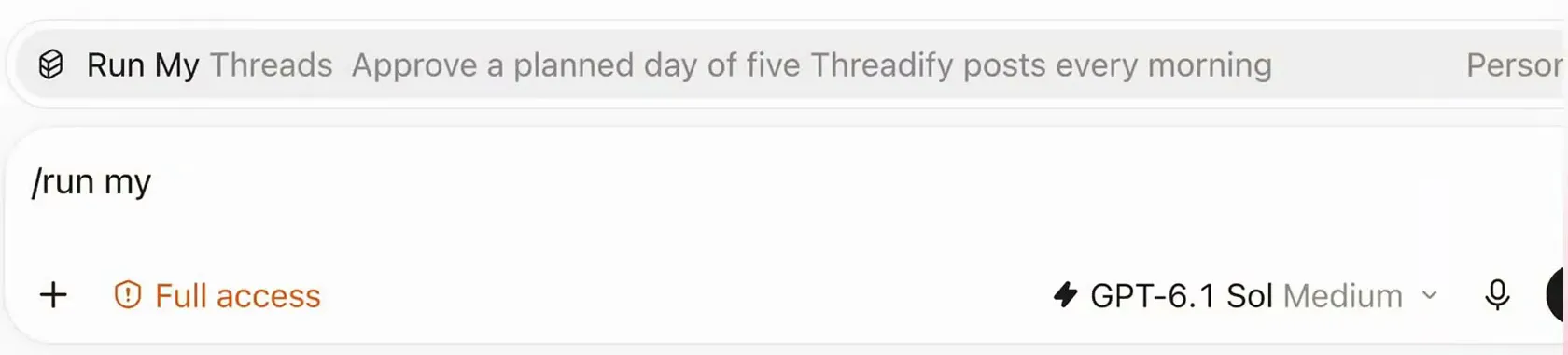
Typing /run my brings up the Run My Threads skill and its description: approve a planned day of five posts every morning.
Step 4: Check the setup choices for your account, then confirm
Before it writes anything, the agent shows which Threads account it's connected to and suggests setup choices for you to confirm or change:
Try Threadify for free
Write better Threads in less time. Generate, refine, schedule—without the chaos.
- Timezone
- Daily preparation: when the daily run happens on your computer
- Style: for example, all lowercase but keeping proper names capitalised
- Topics: Threadify picks them for you, based on what it knows about your account
- Short-post-only day: a day with short posts only and no threads
- CTA level: how much selling you want (CTA is short for call to action). Growth means no selling, Balanced means two calls to action a day and Conversion means lots of selling.
The example run used Australia/Perth, 5:30am, lowercase, Sunday and Balanced. Yours will differ. If anything's wrong, say what to change in plain words. The reply also says "Nothing generated or scheduled yet", so nothing gets written until you're happy. When it looks right, reply:
confirmed
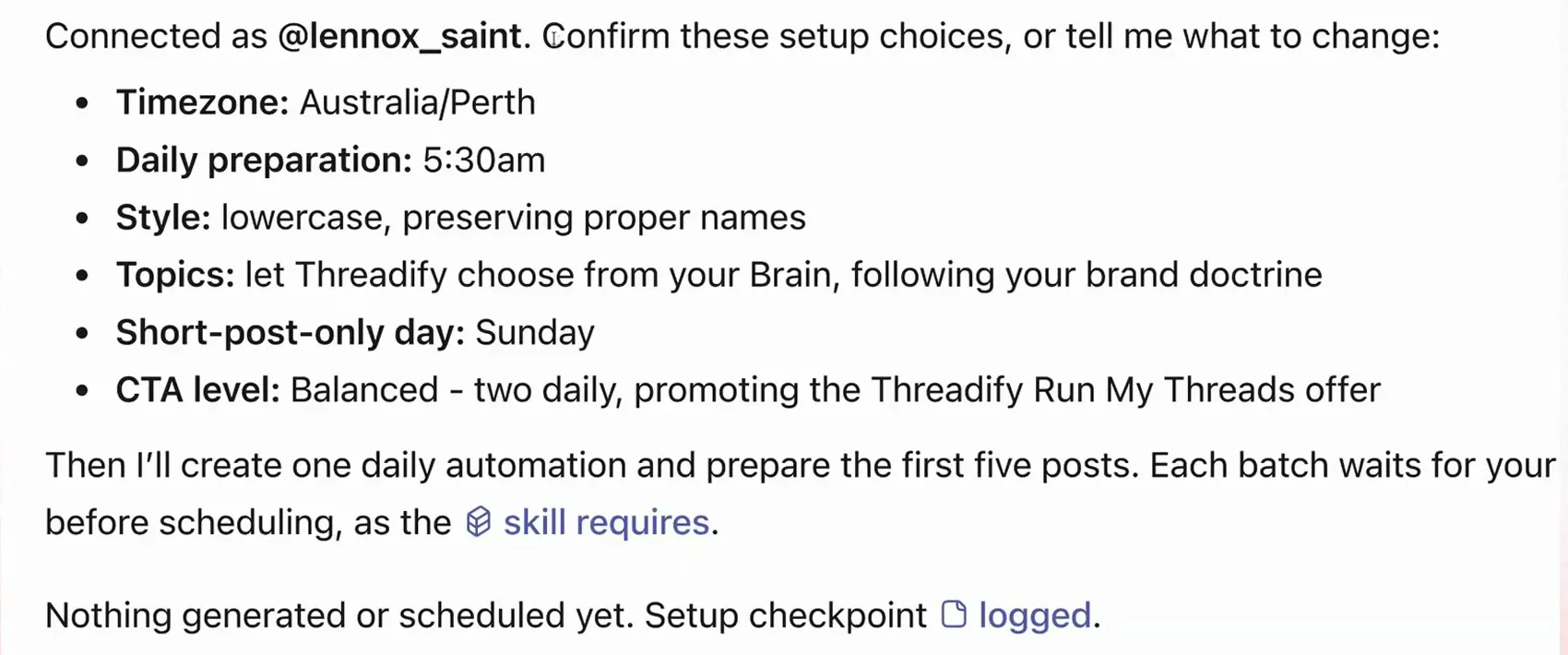
The setup choices the agent suggests: timezone, daily preparation time, style, topics, short-post-only day and CTA level. Nothing has been written or scheduled at this point.
Step 5: See your whole week planned before a post is written
Once you confirm, the agent creates the daily Run My Threads run at your preparation time and lays out a week plan, one row per day with five post slots in each. In the example plan, every day shown has two listicle + CTA slots (the Balanced level's two calls to action), and Sunday, the short-post-only day, is the only day without a thread.
The agent reported that the example plan passed all its checks: 35 posts, six threads and 14 calls to action.
It doesn't write all 35 at once. Each day at your preparation time, it writes that day's five posts. On the first day it catches up straight away, so you don't wait until tomorrow. In the example run, it looked at the next 24 hours and the posts already scheduled before choosing posting times. In ChatGPT, the daily run arrives as a scheduled message in this same chat, so your earlier feedback is still fresh for the agent.
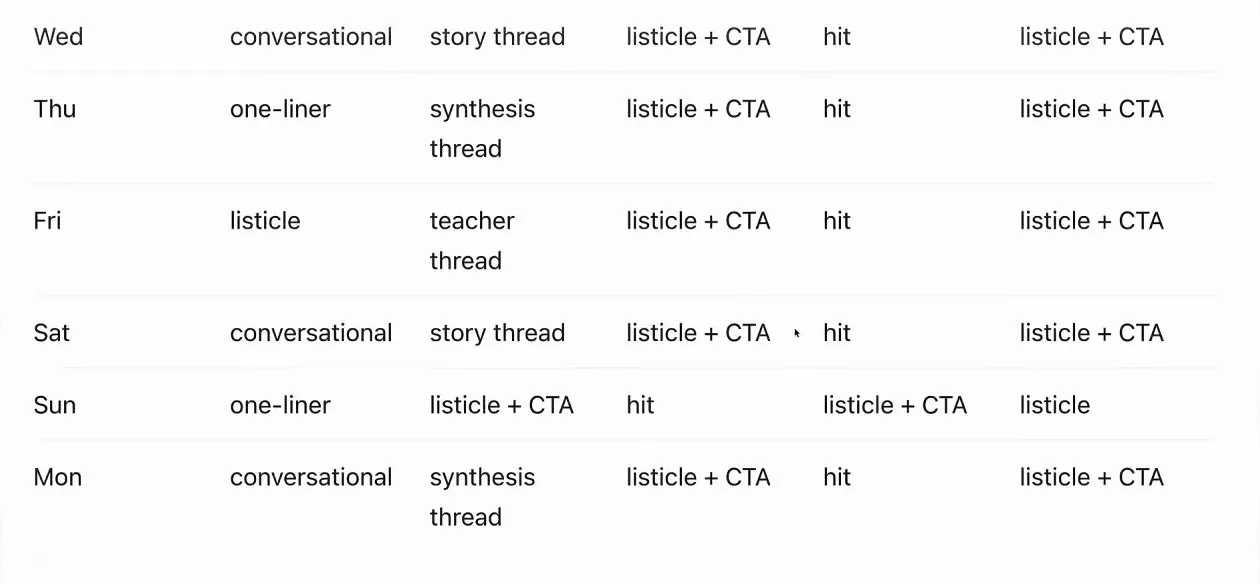
The example week plan, one row per day with five post types in each. Notice the two listicle + CTA slots on each day and no thread on Sunday.
Step 6: Fix flat posts by saying what's wrong in plain words
Read today's five posts the way a follower would, and if they're dull, say so. ChatGPT tends to tone down the posts Threadify writes, so expect to push back sometimes.
You don't need clever prompt writing. The screenshot below shows the full feedback message from the example run. It told the agent the posts were boring and asked for:
- more of the viral structures saved in Threadify's vault and the account's own greatest hits, with proven hooks
- no more reusing the same proof across different posts
- threads about 30% shorter
- a plain threadify.app/home link instead of a tracking link, because Threadify tracks links in published posts automatically
Write your own version about your own posts. Because the agent is connected to Threadify, it can save preferences there. In the example run, it saved the clean-link request in Threadify's memory.
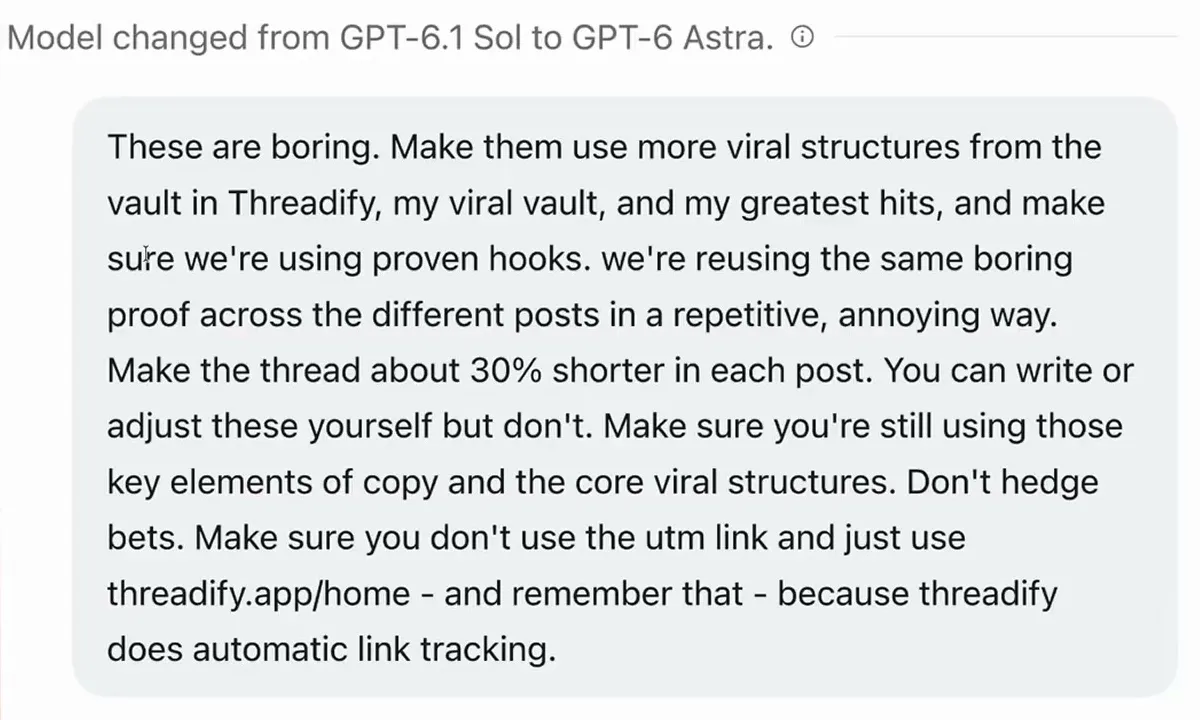
Feedback in plain words: make the posts less boring with proven viral structures and hooks, shorten the threads and use a clean link.
Step 7: Approve today's five posts and get them scheduled
The agent rewrites the posts and shows them again. Read every one before you approve. One revised post from the example run was a numbered list called Business wins, listing 6 business wins that "don't look like wins" and ending: "nobody claps for any of this. good. clapping was never the business."
When you're happy, tell the agent to go ahead. A plain yes works. The example run used this:
Schedule those and let me know what the next step is.
Its five posts were then scheduled for 7pm that evening and 8am, 10am, 12:30pm and 3pm the next day, Perth time.

One revised post from the example run, a numbered list called Business wins, shown in full so you can read it before approving.
What your mornings look like once it's running
At your preparation time each day, the agent prepares that day's five posts in the same chat and waits for you. You read them, give a round of feedback if they need it, and approve. Your feedback stays in that chat for the next run, and preferences the agent saves in Threadify, like the clean link, stay there too.
You also skip the weekend batching session. Instead of writing a full week of posts in one sitting, you deal with one day at a time, from a plan you've already seen.
Is a daily AI posting routine right for you?
- The agent only schedules after you approve, but approving means reading. It can't protect you from a weak or wrong post you wave through.
- Expect to give some feedback. ChatGPT can flatten posts, which is why the example run had to ask for viral structures and proven hooks.
- The settings shown belong to one account. The Perth timezone, 5:30am run, Sunday short-post day and Balanced CTA level are examples, so choose what fits your week and your audience.
- The example run covers setup, preparing the posts and scheduling them. It shows nothing about how those posts performed, so there's no promise of reach or followers here.
- The daily run happens in your agent app on your own computer. Check how your app handles a run when your computer is asleep or the app is closed.
- It's not for you if you want to write every word yourself, or if you want posts to go out with no review.
Line up your first five Threads posts
Setup takes one connection, one install message and one confirmation. After that, each morning starts with posts to approve. Open Threadify to connect your Threads account and find the Agent tab, and your first five posts can be ready for your yes today.
Frequently Asked Questions
Does the agent post anything to Threads without my approval?+
No. It prepares each day's five posts and waits. Nothing is scheduled until you approve, and during setup nothing is even written until you confirm the setup choices.
Can I use Claude instead of ChatGPT?+
Yes. The routine works from the ChatGPT desktop app, the Claude desktop app and Claude Code. Connect the app from Threadify's Agent tab first, then install the workflow the same way.
Can I make the posts sell less, or more?+
Yes, with the CTA level. Growth means no selling, Balanced means two calls to action a day, and Conversion means lots of selling. Tell the agent which one you want during setup.
Does it write the whole week of posts at once?+
No. It plans the week up front, then writes one day's five posts at a time, at the preparation time you choose. On your first day it catches up straight away.
Why do some of the posts sound bland?+
ChatGPT tends to tone down the posts Threadify writes. Tell the agent in plain words: ask for proven hooks and the viral structures in Threadify's vault and your greatest hits, then read the revised versions.
Try Threadify for free
Write better Threads in less time. Generate, refine, schedule—without the chaos.