Stop Guessing What to Post on Threads. Let Your AI Agent Test It
Guessing what to post on Threads next? Have your AI agent read your analytics, turn your best posts into two small tests and six Threadify drafts, then learn from the results.

Why you keep guessing what to post on Threads
You open Threads with a coffee and no plan. One of your posts took off months ago, and you still can't say why. Was it the opening line? The list? The hour you posted it? So you write something "a bit like that one", post it, and watch it sink. Next week you do it all again.
What's missing is proof of which ideas work for your audience. Without it, every guess risks a post people scroll straight past.
This workflow hands that guesswork to your AI agent. It reads your analytics, finds the posts that already worked for you and turns them into two small tests. Then Threadify writes six drafts in your voice. You review them, the agent schedules them at your best times, and it keeps checking the results so the next batch builds on what worked.
For a one-off check of what still works, see find the Threads posts that still work and schedule three more. This workflow keeps going after the first batch.
What you need before you start
- A Threadify account with your Threads account connected. Agent connections come with every paid plan.
- An AI agent app, such as Claude, ChatGPT or Gemini.
- Some posting history on Threads, so the agent has winners to learn from.
How to build a self-improving Threads content loop (7 steps)
Step 1: Give your AI agent access to your Threadify account
Your agent can only read your analytics and save drafts once it's connected to Threadify. In Threadify, open the Agent tab, choose your agent and follow the numbered steps on screen.
For Claude, copy the link under Connector URL, then in Claude open Settings → Connectors → Add custom connector. Name it Threadify, paste the link, log in when your browser opens and click Allow. For more detail, see how to connect Claude to Threads with Threadify.
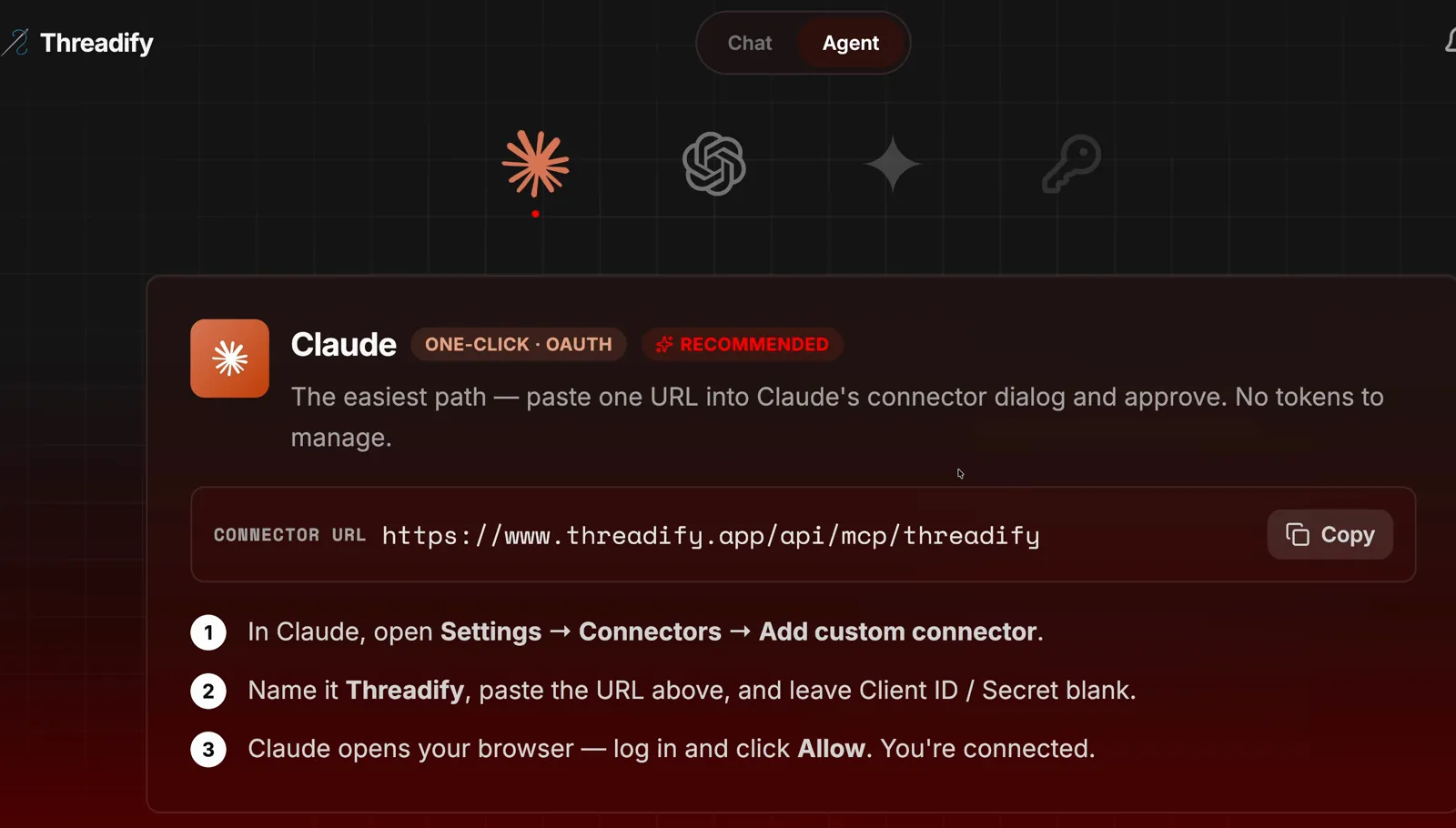
The Agent tab with the Claude card. Copy the link under Connector URL, then follow the three numbered steps.
Step 2: Install the free Growth Loop with one message
One message installs the workflow and starts your first run. Open a new chat in your agent and type the line shown in the screenshot: the free workflows link, then "install this github repo and run the Growth Loop". In full, it reads "https://github.com/lennoxsaint/Threadify-workflows install this github repo and run the Growth Loop". A GitHub repo is a public folder of files, and this one holds the free workflows. Answer any questions the agent asks along the way.

The whole install message: the free workflows link followed by one plain request to install it and run the Growth Loop.
Step 3: See which of your posts already won, and what to test next
You find out which posts actually worked for you, so your next drafts start from proof. The agent goes through your analytics and picks your winners.
In the example run, the two biggest posts were nearly the same post. Both were a list about what you want at different ages, published in December 2024 and again in October 2025. One reached 1,684,246 views and the other reached 1,104,736.
From those winners the agent picks two tests that each change one thing (in the example run: does the exact number help, and does showing proof first help?), so read them before it starts drafting.
Try Threadify for free
Write better Threads in less time. Generate, refine, schedule—without the chaos.
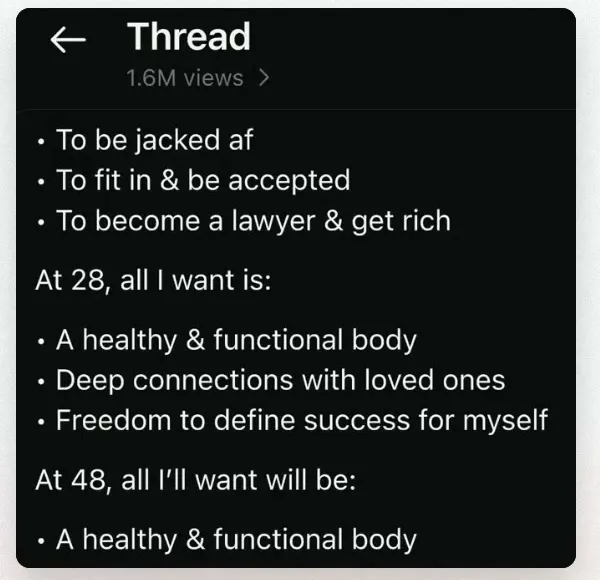
One of the example account's winning posts in the Thread view, with 1.6M views and the age-and-priorities list the agent spotted.
Step 4: Have Threadify write all six drafts in your voice
This step keeps the drafts in your voice. The batch is six posts: two broad, two about the craft of posting and two personal. Four use patterns that already work for you, and two carry the tests.
Your agent may write its own versions instead of asking Threadify. In the example run, the agent's first drafts were its own local rewrites, and they sounded sloppy. To avoid this, ask your agent to have Threadify write all six and to show you the Threadify draft ID for each one.
In the example run, the agent replaced its own versions and confirmed: "All six now have Threadify draft IDs."
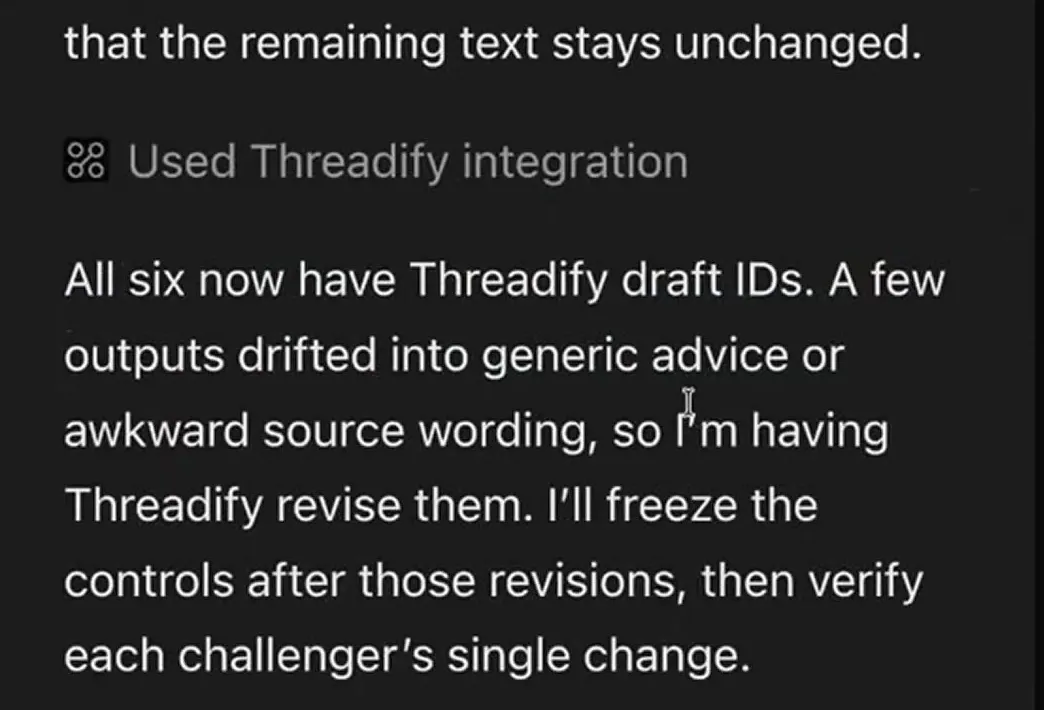
The agent confirming that all six drafts now have Threadify draft IDs, and that it's asking Threadify to revise a few.
Step 5: Check every draft sounds like you before you save it
You stay in charge of what goes out under your name. Read each draft as if you were about to post it. Does it sound like you? Does each test post change only the one thing it's testing? Fix anything that's off, then ask your agent to save the six drafts in Threadify and tell you the next step.
In the example run, Threadify's draft used the real view counts in the account's own lowercase style.

A Threadify draft in the example account's voice, using the exact view counts of the two winning posts.
Step 6: Schedule the six posts at your best times
The agent picks the times from your own analytics, so you don't have to work them out. Type:
schedule them at the best times to post
The agent reads your Threadify and Threads analytics and picks open slots. In the example run, it found strong overnight slots for that account over the last 90 days. It skipped a Saturday 10:30 am slot that was already booked and scheduled the six posts across 3 to 8 October (Perth time). Your times will come from your own history.

Six scheduled slots from 3 to 8 October in Perth time, with the already-booked Saturday 10:30 am slot left alone.
Step 7: Turn on automatic learning so each batch builds on the last
From here, each batch learns from the one before it. Type:
set up automatic learning
Once your posts are live, the agent checks that each one published. Then it measures each post's engagement rate 72 hours after publishing: likes, replies, reposts, quotes and shares, divided by views. (For how to read that number, see what a good Threads engagement rate is.) It tracks your two tests, keeps what keeps working and has Threadify draft the next batch.
In the example run, it checks every six hours, at 5:20 am, 11:20 am, 5:20 pm and 11:20 pm Perth time. To stop it at any point, tell your agent "pause automatic learning".
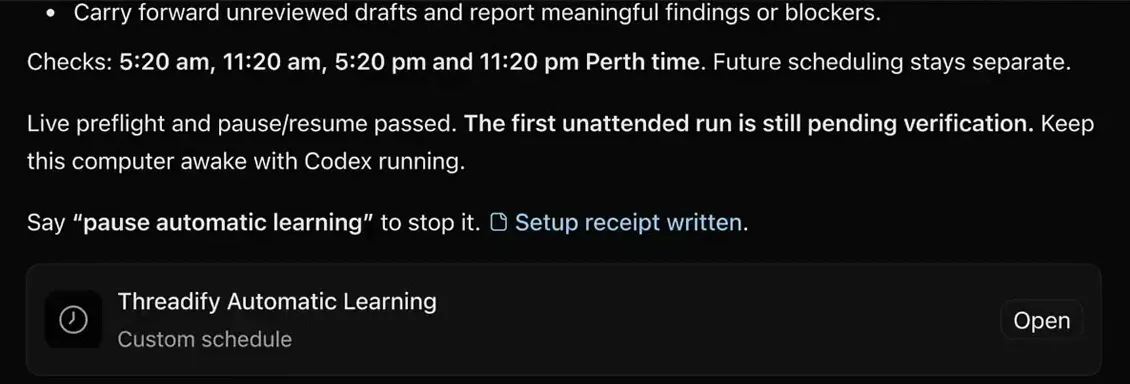
The agent's setup summary, with the check times, a note that scheduling stays separate and how to pause automatic learning.
What to expect from your first Growth Loop run
- Check that Threadify wrote every draft. If a draft has no Threadify draft ID, your agent wrote it itself, so ask it to have Threadify write that one again.
- Real results take days. Each post is measured 72 hours after it's published. In the example run, the six posts were scheduled but none had been published yet, and the tests were too early to call.
- One good post isn't a lesson. The agent needs at least three comparable tests, measured after the 72-hour wait, across two different publication days before it treats a pattern as a lesson. Expect early verdicts to say it's too early to call.
- Scheduling stays with you. Automatic learning drafts the next batch, but scheduling it is still your call. Read the drafts closely at first, while you're giving the agent feedback, and give it more freedom later only if you're comfortable.
- In the example run, automatic learning ran on the computer itself. The computer had to stay awake with the agent app open, and the agent noted: "The first unattended run is still pending verification."
Find out what to post on Threads this week
Your best posts are already sitting in your analytics. Open Threadify and connect your AI agent, then send the install message from step 2. Your first run ends with six Threadify drafts built from your own best posts, plus two tests the agent keeps tracking.
Frequently Asked Questions
Does the Growth Loop publish anything without my say-so?+
It schedules posts only when you ask it to, as in step 6. Once automatic learning is on, it has Threadify draft the next batch, but scheduling that batch stays with you.
How does the agent decide whether a post did well?+
It measures each post's engagement rate 72 hours after publishing: likes, replies, reposts, quotes and shares, divided by views. A pattern only counts as a lesson after at least three comparable tests, measured after that wait, across two publication days.
Which AI agents can run the Growth Loop?+
You can connect Claude, ChatGPT, Gemini or a similar agent to Threadify from the Agent tab. Agent connections come with every paid Threadify plan.
How do I stop automatic learning?+
Tell your agent "pause automatic learning" and the recurring checks stop.
Is the Growth Loop workflow free?+
Yes, the workflow itself is free. It runs on Threadify, so you need a paid Threadify plan, which includes agent connections.
Try Threadify for free
Write better Threads in less time. Generate, refine, schedule—without the chaos.