
Out of Post Ideas? Let Your AI Agent Find One in Your Threads Comments
Real questions from people who might buy are sitting in your Threads comments. Copy four prompts and your AI agent finds one, then Threadify turns it into a private draft you approve.

There's a month of comments sitting under your Threads posts. Somewhere in there is the person who asked how your offer actually works, and the one who said they were stuck on the exact problem you solve. You meant to reply that night, and then the day got away from you.
Scrolling back through all of it now feels like homework, so you close the app. Tomorrow you post another general tip that could have come from anyone, because nothing better came to mind. The person with the real question never gets an answer, and you never find out whether they'd have booked a call.
This walkthrough has your AI agent read the last 30 days of comments for you and pick out one real question worth answering. Threadify then writes the post, and it stays a private draft until you approve it.
Who this works for
Creators who already post on Threads and sell something, like coaching, a course, a template or a service. You want your next post to answer a question someone actually asked.
If you'd rather work through your comments by hand, start with how to find the Threads comments that matter and the three-step loop for turning replies into posts. Coaches can also read how to turn client questions into Threads posts.
What you need before you start
A paid Threadify plan with your Threads account connected. Agent connections come with every paid plan.
An AI assistant you already use: Claude, ChatGPT or Gemini.
Comments on your posts. The workflow reads the ones already there, so there's nothing to prepare.
How to find your next post in your Threads comments (7 steps)
Steps 1 to 3 are a one-time setup. After that, finding your next post takes two prompts.
Step 1: Connect the AI assistant you already use
You keep working in the chat app you know. In Threadify, flip the switch at the top of the composer from Chat to Agent, scroll down to Set up a client and click your assistant. Claude is marked Recommended. Follow the steps on screen for the one you pick. Once you approve access, your agent appears under Your connections. If you use Claude and want every click spelled out, see how to connect Claude to Threads.
Try Threadify for free
Write better Threads in less time. Generate, refine, schedule—without the chaos.
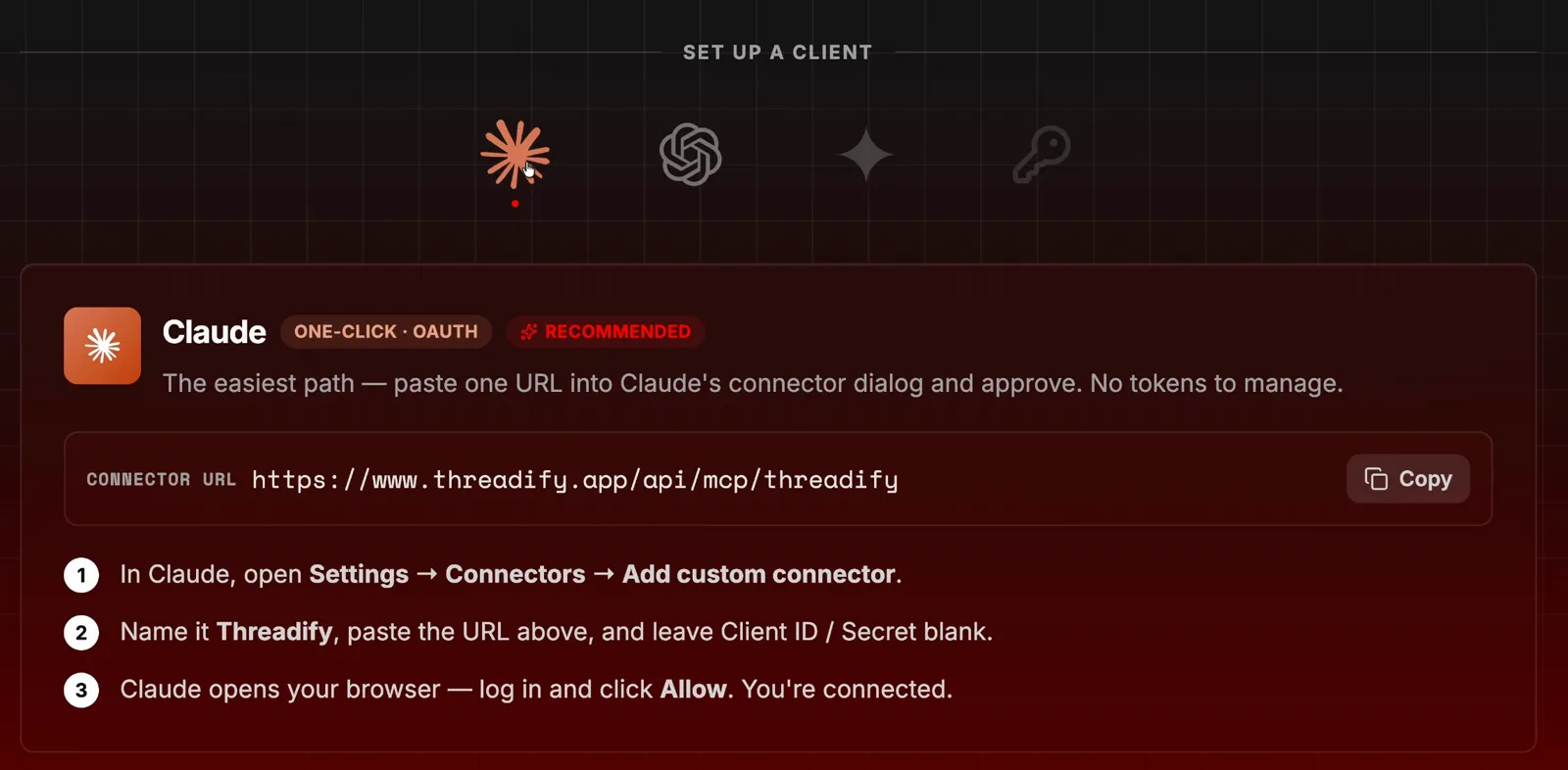
Step 2: Check that your agent can reach Threadify
A quick check now means you won't be guessing later. Start a new chat with your agent and type:
confirm threadify connection
Wait for it to give you the okay before moving on.

Step 3: Install the free workflow with one message
You don't download or set up anything yourself. Paste this into your agent's chat box:
https://github.com/lennoxsaint/Threadify-workflows install the buyer questions to content workflow
Once it's installed, your agent can tell you what the workflow does with your comments. It strips out identifying details, drafts one answer as a post, and tells you whether the idea came from one person or from several people asking the same thing. It won't make up demand that isn't there.

Step 4: Hand over the month of scrolling
One prompt does the reading you've been putting off. Type this into your agent:
execute /buyer questions to content based on comments i've received over the past 30 days

Step 5: See how much it read
You get a count of what the agent actually looked at. When Lennox ran it on his own account, his agent worked for two or three minutes and reviewed 1,611 comments across 218 posts. Your numbers will depend on your account. The count only covers the comments the agent got back, so don't treat it as proof it saw every reply. You can watch Lennox's full run from start to finish.
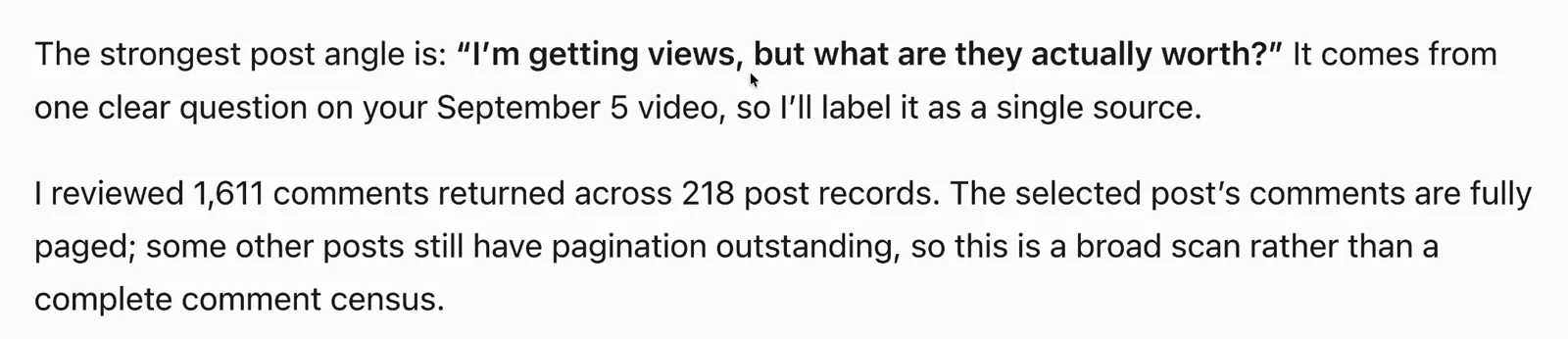
Step 6: Check how strong the evidence is
You find out whether you're answering one person or a repeated pattern. The agent names the question it picked and labels its evidence. In Lennox's run, the question was "I get views, but what are they worth?" It was labelled single source, one person, with buyer status unknown. One person asking is a fine reason to write a helpful post, though it doesn't prove there's a market. To judge which askers might be ready to buy, see how to spot buyer intent in Threads replies.
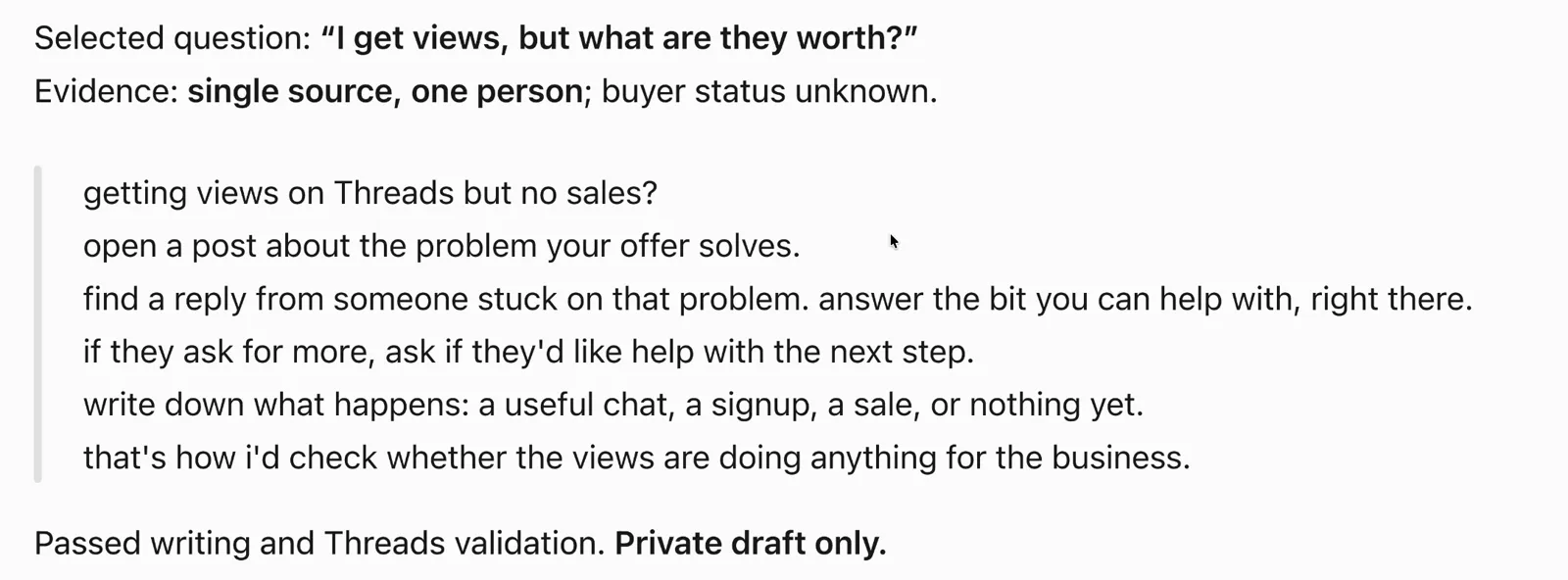
Step 7: Let Threadify write it, then decide what goes out
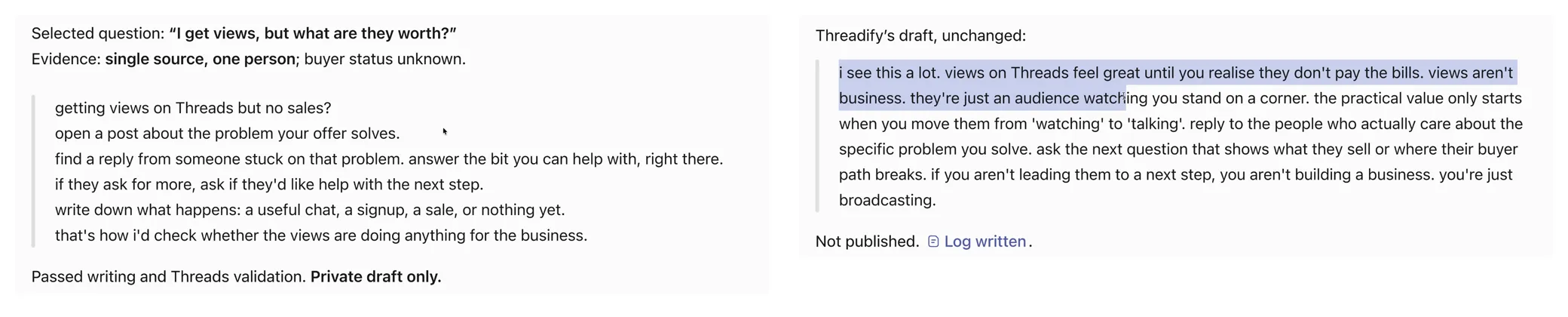
If the agent's first draft reads flat, you don't have to fix it yourself. Ask your agent to pass the job to Threadify:
use Threadify to write the post instead; don't edit it.
"Don't edit it" tells your agent to bring back Threadify's version exactly as written, so you can put the two drafts side by side. Lennox found Threadify's version felt much more natural than the first draft. If you want to know why plain AI drafts sound flat, this post explains the missing context. Trim it yourself, or ask your agent to use Threadify to tighten it. It stays a private draft until you approve it.
What to expect from your first run
One question is one signal. When the label says a single person asked, write the post to help them and hold off on building an offer around it.
The workflow drafts a post and doesn't reply to anyone, so the person who asked still deserves a direct answer from you.
It works from the comments your agent gets back. Treat it as a broad scan of your month that can miss some replies.
Anything your agent does through Threadify draws on the same monthly credits as the rest of the app. You can see what it used under Monthly Usage on your billing page.
What if you don't get many comments?
A quiet month gives the workflow less to work with. With only a handful of comments, it may turn up a weaker question or none worth writing about. Post a few things that invite questions first, then run it again.
Find your next post this week
Open Threadify and switch to the Agent tab to connect the assistant you already use. Once it's connected, the four prompts above take you from last month's comments to a private draft you approve.
Frequently Asked Questions
Which AI assistants work with this?+
Claude, ChatGPT or Gemini. Choose yours under Set up a client in the Agent tab and follow the steps on screen. Claude is marked as the recommended option.
Do I need a paid Threadify plan?+
Yes. Agent connections come with every paid plan. Anything your agent does through Threadify draws on the same monthly credits as the rest of the app.
Will the workflow post to Threads for me?+
No. It keeps the post as a private draft, and Threadify's version comes back unchanged and marked not published. You decide what to edit and when to post it.
What if it only finds one person asking the question?+
The workflow tells you, with a label like "single source, one person". One question is a good reason to write a helpful post, but it isn't proof of a market trend.
Does it share my commenters' details?+
The workflow removes identifying details from the questions before drafting, so the post answers the question without naming the person who asked it.
Try Threadify for free
Write better Threads in less time. Generate, refine, schedule—without the chaos.