
Find Your Threads Posts That Sound Like Slop, Then Post Raw Ones
Suspect your careful posts do worse than your blunt ones? Let your AI agent score 90 days of Threads posts for slop, show raw vs polished views and write three raw posts you approve.

You wrote the careful version. You softened the claim, added "I think" so nobody would argue, and tidied it into something you'd happily show a client. Then it sat there with a handful of views, while the blunt one-liner you nearly deleted pulled the replies.
You've half noticed this for months. Proving it means scrolling back through your own feed and checking the view count on every post, and that's an evening you never find. So you keep writing the polished version because it feels safer, without knowing whether it's the thing holding you back.
This workflow settles it with your own numbers. Your AI agent, connected to Threadify, scores your last 90 days of Threads posts for slop. It compares the median views of your raw posts and your polished ones and shows you the posts and words with the highest slop scores. Then it writes three new posts in your own raw pattern. Nothing is scheduled until you reply yes.
What makes a Threads post sound like slop?
The slop test looks for four markers:
- Corporate voice: "I'm excited to share", plus buzzwords like synergy.
- AI tells: the familiar "it's not this, it's that" line.
- Over-formatting: title case, hashtags, headers and bullet points.
- Hedging: might, maybe, I think, it depends.
Hedging counts most. Each hedge adds three points to a post's score, and every other marker adds one. You don't need AI to write like this. Hedging is the polish people add when they're nervous about sounding too sure. If your AI drafts sound fake for a different reason, such as missing context about you, start with why AI content still sounds fake or using a Knowledge Base to stay authentic.
What you need before you start
- A Threadify account with your Threads account connected.
- An AI agent: the Claude desktop app, Claude Code or ChatGPT. Agent connections come with every paid Threadify plan.
- Some posting history. The workflow reads your last 90 days. If you don't have much, see the section on short histories below.
How to find your slop posts and get three raw ones scheduled (eight steps)
Step 1: Let your AI agent read and schedule your Threads posts
Once your agent is connected, it can see your posts and their views, and later book the new ones. Sign in to Threadify (the bright red Start finding leads button, then Sign in with Google) and connect your Threads account. Then open the Agent tab, scroll to the bottom of the page and pick your agent.
For Claude, copy the link under Connector URL. In Claude, open Settings → Connectors → Add custom connector, name it Threadify, paste the link and leave Client ID / Secret blank. Claude opens your browser: log in and click Allow. For any other agent, follow the steps on its card. There's a fuller walkthrough in how to connect Claude to Threads.
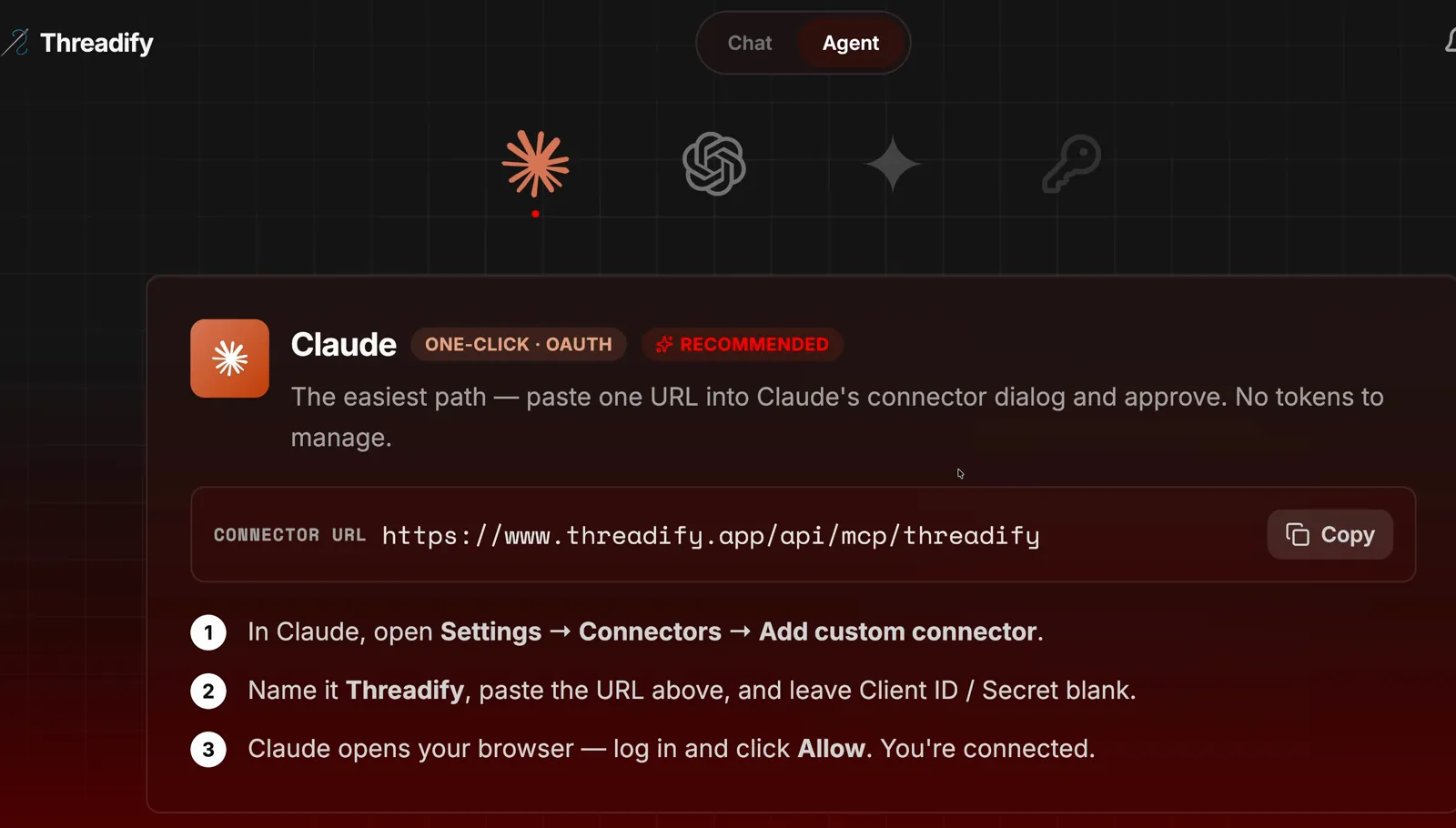
The Agent tab with the Claude card. Notice the Copy button next to the Connector URL and the three numbered setup steps underneath.
Step 2: Add the free unslop workflow to your agent
This step teaches your agent the slop test and everything that follows it. Start a new chat in your agent and paste this whole message:
https://github.com/lennoxsaint/Threadify-workflows
Install this, run get set up, and then the unslop workflows.
Your agent installs the free Threadify workflows and runs the setup workflow first. Then it gets the unslop workflow ready.
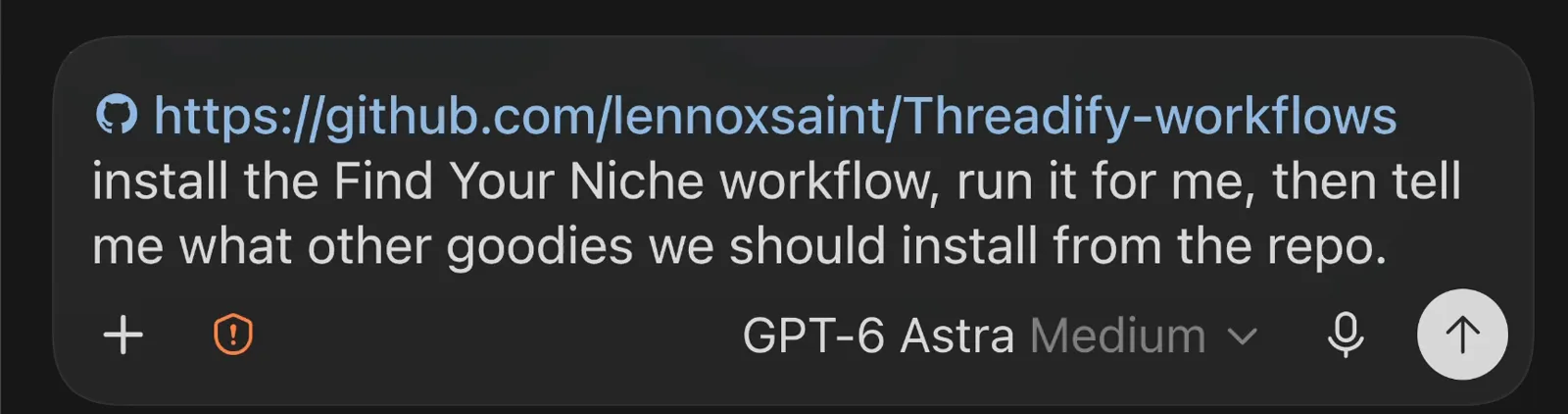
An install message in the same shape: the workflows link first, then one plain request. This one asks for a different workflow; yours asks for unslop.
Step 3: Start the slop check on your last 90 days
One command does all the reading for you. Type the command shown in the screenshot, /threadify-unslop, into the prompt box and press enter.
Your agent first confirms which Threads account it's connected to, so check that it names the account you expect. It then reads every post from the last 90 days, with each post's full text and views.
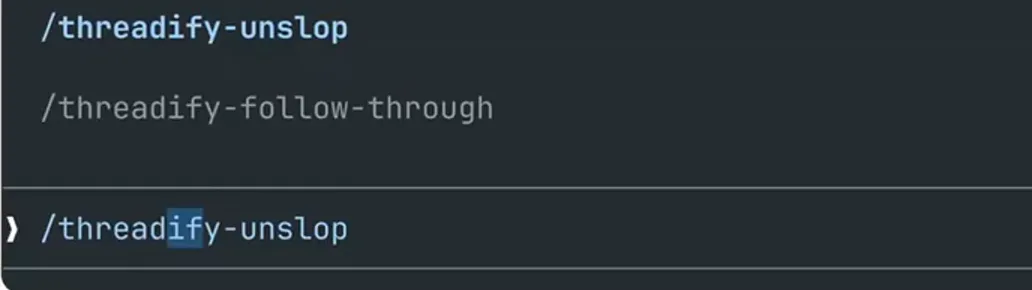
The command menu. Notice /threadify-unslop highlighted in the list and the same command typed after the ❯ in the prompt box.
Try Threadify for free
Write better Threads in less time. Generate, refine, schedule—without the chaos.
Step 4: See whether your raw or polished posts get more views
This is the answer to the question you've been guessing at. Every post is sorted into one of two groups:
- Raw: no hedges and at most one other marker.
- Polished: at least one hedge, or two or more other markers.
The verdict table shows how many posts landed in each group and the median views for each. The median is the middle value, so a single big post can't drag the result around.
In the example run shown here, the agent scored 550 posts from the last 90 days: 512 raw and 38 polished. Raw posts had median views of 900 against 516 for polished, so raw came out ahead by about 1.7x on that account. Of the 38 polished posts, 29 had a hedge in them. Your split will be different, which is why it's worth running on your own posts.
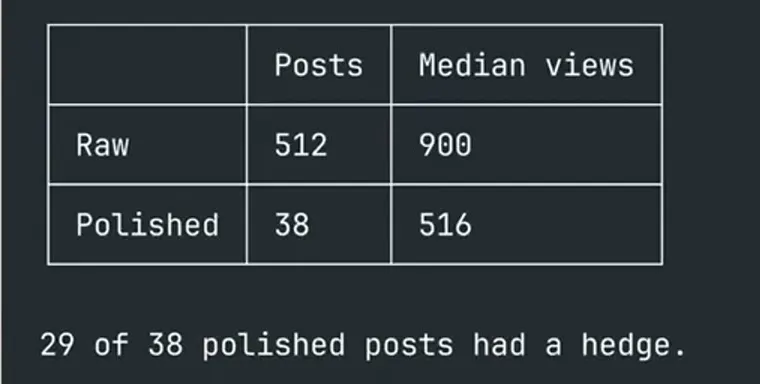
The verdict table. Notice the post count and median views for each group, and the hedge line underneath.
Step 5: Find the posts and words with the highest slop scores
You come away with a short list of words to stop reaching for. The Top 5 offenders table shows each post with its views, its slop score and the exact words that were flagged.
In the example run, most of the flagged words were hedges: "could", "try", "might" and "probably". One post was flagged for the line "anyone else noticing this?". The worst post scored 6, two hedges at three points each. No AI was involved in these posts. The writer was trying to sound professional.
One flagged post still reached 8,273 views, so a flag doesn't doom a post. Treat the list as wording to watch, and read the flagged words aloud to notice which ones you use without thinking.
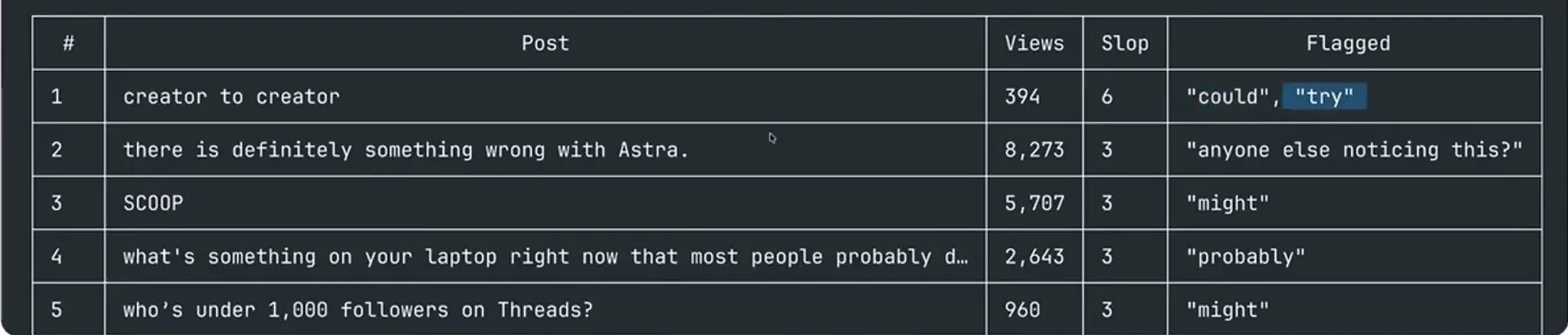
The Top 5 offenders table. Look at the Flagged column: these are the exact words that raised each post's score.
Step 6: Get three new posts written in your own raw pattern
The new posts are built on what has already worked for you. Your agent studies your best raw posts and describes what they have in common, then Threadify writes three posts in that pattern.
In the example run, the top raw posts led with the claim, picked a side and ended there. Most were one to three short lines, with no warm-up and no question at the end. The first new post read: "Followers without a destination is just ego. That is all."

The agent's confirmation that three posts were written. Notice the first post underneath: two short lines that open with the claim and stop.
Step 7: Check that every new post passed the hedge check
This check stops the new posts from repeating the habits you've just found. Each one goes through a gate that checks for hedges and slop markers. Look for gate PASS above each post.
In the example run, post 2 passed on attempt 1 and post 3 passed on attempt 2, after a rewrite. All three cleared the gate with zero hedges and zero slop markers.
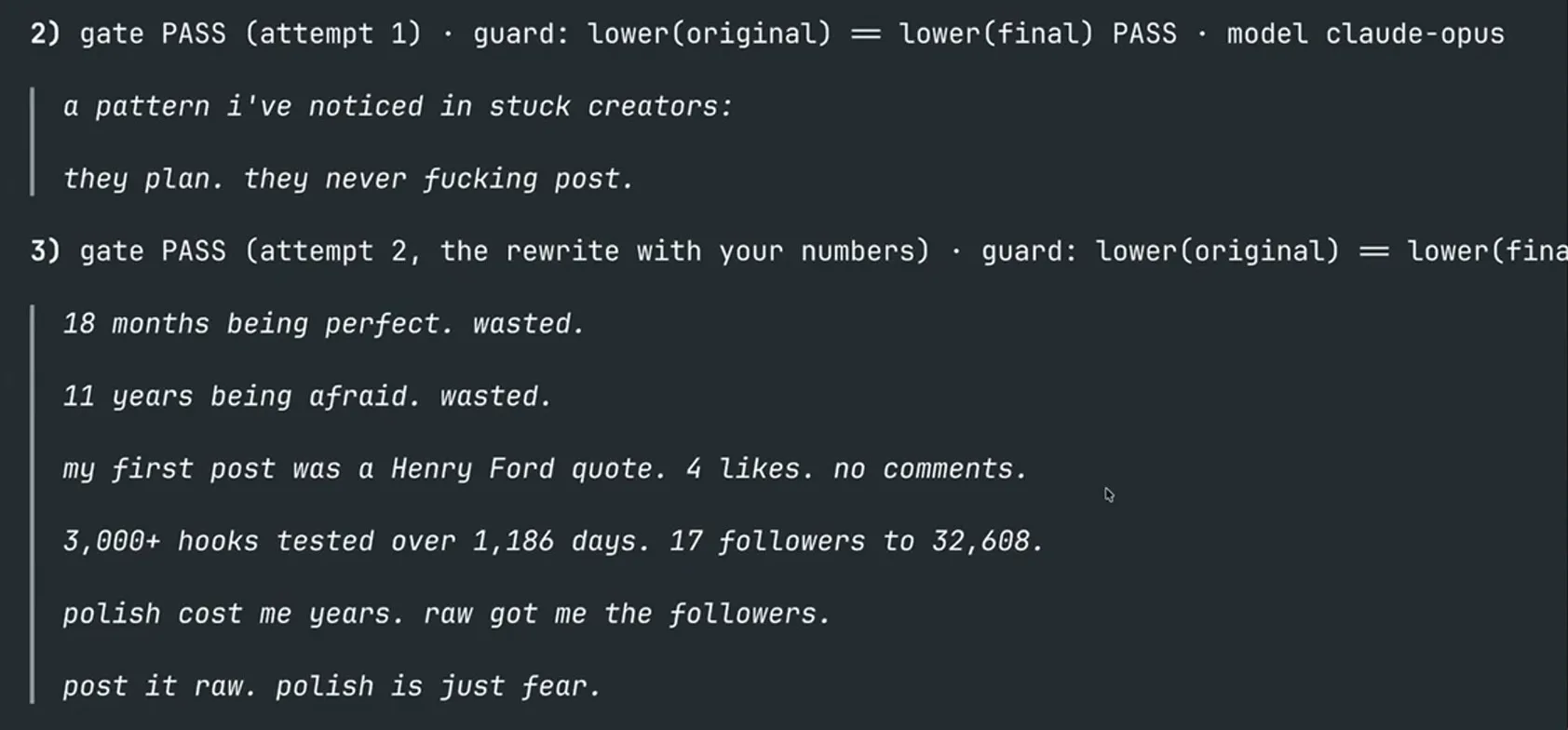
Posts 2 and 3, each under its gate PASS line. Note that post 3 needed a second attempt.
Step 8: Schedule all three posts with one reply
You approve once and the posts are booked, without you opening a calendar. Before anything is scheduled, your agent shows you the three posts, their plugs and the proposed slots. An auto plug is a delayed call to action that appears beneath a post after it goes live; Auto Plug vs manual CTAs explains how they work. The slots start from your strongest posting times. Where those are already taken, each post gets that day's best open slot with no other post within 90 minutes.
If you're happy, reply:
yes
Reply no and nothing is scheduled. After a yes, the agent reads each post back from Threadify and shows you a table. In the example run, the posts landed on Fri 9 Oct at 6:00 pm, Sat 10 Oct at 9:00 pm and Sun 11 Oct at 5:30 pm (Perth time), each marked scheduled with a plug 15 min after.

The readback table. Each post has its slot and a green check: scheduled, with plug 15 min after.
What to do after your first slop check
Keep the flagged words in front of you the next time you draft, and compare how the three new posts do against your usual ones. The check can't promise more views, but it swaps a hunch for your own numbers.
What if your numbers look different, or you don't have many posts?
- Your split is your own. The 1.7x gap and the 512 vs 38 split belong to the example account, and your polished posts may do just as well. If only a handful of posts land in one group, treat the gap as a rough signal.
- Short posting history? Give the workflow about 10 examples of your own writing. The closer they are to Threads posts, the better. It flags the slop in them and writes three posts that sound like you. For a longer-term fix, set up Threadify to sound like you.
- Long lines can be cut off. In the example run, the right edge of some long lines ran off the window, so a few lines in the screenshots above are partial. If that happens to you, ask your agent to show the post in full before you say yes.
Find out whether your polished posts are holding you back
You've probably sensed this pattern for a while. One run shows whether your own numbers back it up, and you can approve three raw posts at the end. Open Threadify and connect your agent to run the slop check on your last 90 days.
Frequently Asked Questions
Will Threadify schedule anything without asking me?+
No. The agent shows you the three posts, their plugs and the proposed slots, then waits. Reply yes and they're scheduled. Reply no and nothing is scheduled.
Which AI agents can run the unslop workflow?+
You can run it in Claude Code, the Claude desktop app or ChatGPT. Your agent and your Threads account both need to be connected to Threadify. Agent connections come with every paid Threadify plan.
Is using AI the reason my Threads posts sound like slop?+
Not always. In the example run, the top offenders came from someone trying to sound professional, with no AI involved. The slop test checks four markers: corporate voice, AI tells, over-formatting and hedging, and hedging carries the most weight.
What counts as a hedge in a Threads post?+
A hedge is a word that softens your claim, such as might, maybe, I think, it depends, could, try or probably. Each hedge adds three points to a post's slop score. Every other marker adds one.
How does the agent choose when to post the three new posts?+
It starts from your strongest posting times. Where those are already taken, each post gets that day's best open slot with no other post within 90 minutes. You see every slot before you say yes.
Try Threadify for free
Write better Threads in less time. Generate, refine, schedule—without the chaos.