
Get Six Ready-to-Review Threads Posts Every Day for 30 Days
Daily posting on Threads falls apart when you have to decide what and when. Let your AI agent prepare six posts a day for 30 days, then approve, edit, skip or reject each one.

You've promised yourself you'll post on Threads every day. The first couple of days go fine. Then it's late on a Wednesday, the composer is open, and you're scrolling your own profile trying to work out what's worth saying, whether that post from a few months back is too soon to repeat, and what time anyone will actually see it. You close the app and tell yourself you'll do two tomorrow. You don't, and the streak ends there.
What usually breaks a daily habit is the deciding: what to post, which old post deserves a second run, and when to put it out. Meanwhile your strongest posts sit in your history doing nothing.
This workflow hands the deciding to your AI agent. A free skill (a saved set of instructions your agent follows) called the 30-Day Viral Vault has your agent plan 30 days of post slots, prepare six posts for each day and show them to you one at a time. You approve, edit, skip or reject each one, and nothing is scheduled until you say yes. (Still not sure daily posting is worth the effort? Read what posting on Threads every day for months actually looks like.)
What goes into each day's six Threads posts
Every day follows the same mix, so you always know what you're reviewing:
- Posts 1 and 2 come from your own best posts. A post that did well once earned that result, so the plan gives it another run instead of leaving it buried. In the example run, card 2 was an unchanged repost, word for word.
- Posts 3 and 4 borrow viral structures from Threadify's Vault, a bank of viral posts that passed a thousand likes. The agent keeps a post's structure and fills it with your own details.
- Posts 5 and 6 are brand new.
Each post arrives as a card showing how its source did and when the agent suggests posting it. If you'd rather rework an old post into a fresh angle than repeat it, see how to repurpose a Threads post without repeating yourself.
What you need before you start
- A Threadify account with your Threads account connected. Agent connections come with every paid plan, and your agent's work uses the same monthly credits as the app.
- An AI agent such as Claude, ChatGPT or Gemini.
- Time each day to read the cards and decide.
How to get six Threads posts ready to review every day (6 steps)
Step 1: Give your AI agent access to your Threads account
Your agent can't prepare or schedule anything until it can reach your Threadify account. In Threadify, open the Agent tab at the top of the page, choose your agent and follow the numbered steps on its card. For Claude, click Copy next to Connector URL (the link Claude uses to reach Threadify). In Claude, go to Settings → Connectors → Add custom connector, name it Threadify, paste the link, leave Client ID / Secret blank and click Allow when your browser opens. The step-by-step guide to connecting Claude to Threads has more detail.
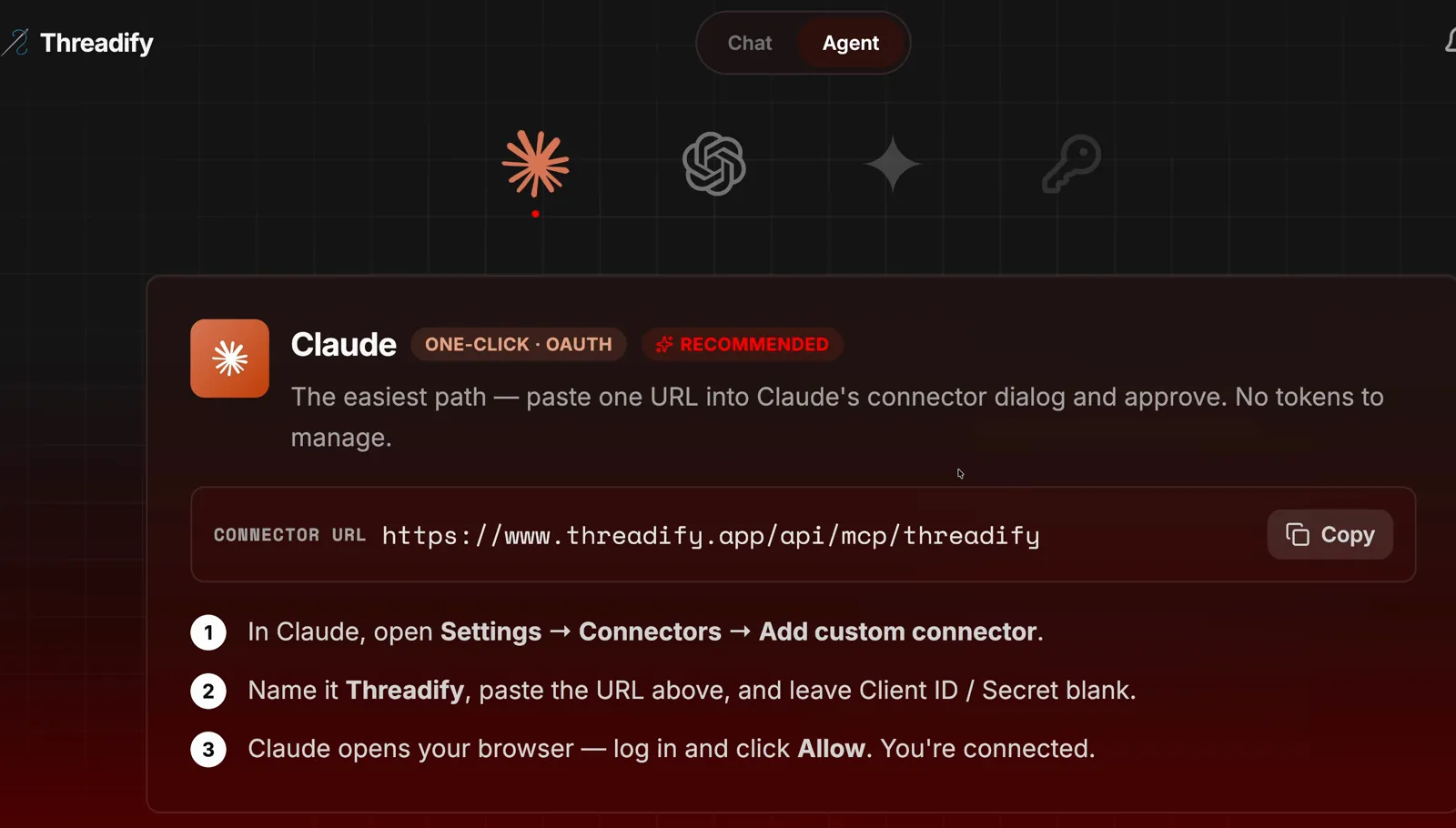
The Agent tab's Claude card. Notice the Copy button beside the Connector URL and the three numbered steps underneath.
Step 2: Install the 30-day plan with one message
One message sets up the whole 30-day plan. Open a new chat with your agent and type the message exactly as the screenshot below shows it: the free Threadify workflows link, then "install this and run the 30-day viral vault skill". Follow any prompts the agent gives you. While it works, the agent checks what's in the Vault, looks at how your recent posts performed, finds your best-performing posts and works out good times to post them.

Notice that the workflows link and the sentence "install this and run the 30-day viral vault skill" go in one message, with the link first.
Step 3: Put the plan on a daily schedule that suits you
With a schedule, each day's first post is ready before you sit down. The agent should set the skill up as a routine by itself. In the example run, the finished routine card reads Viral Vault 30-Day Follower Engine, Daily at 12:00 AM. That time suited the example run, so ask for whatever fits your day:
Try Threadify for free
Write better Threads in less time. Generate, refine, schedule—without the chaos.
Make the 30-day Viral Vault skill run on a schedule every day at 7 a.m.
You can ask for a different rhythm too, such as every second day. Before you rely on the times, check the time zone shown for your agent connection on Threadify's Agent tab, and change it if it isn't where you live. Your agent uses that time zone whenever it reads or sets a time.
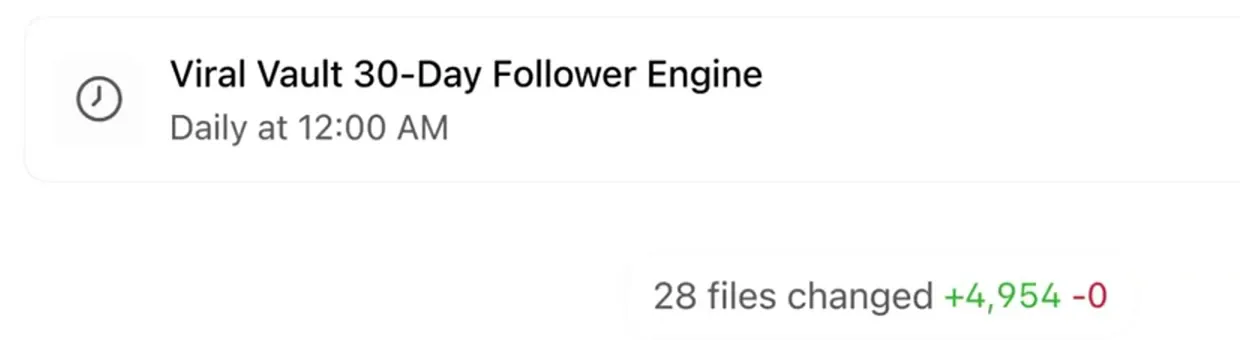
The finished routine card. Notice the name, Viral Vault 30-Day Follower Engine, and the schedule, Daily at 12:00 AM.
Step 4: See why each post deserves a slot before you say yes
Each card tells you why the post is there, so you can judge it on evidence. Read three things: the post text, how its source performed and the Suggested time. In the example run, card 2 of 6 was a short, contrarian one-liner about networking and community building. The card noted it was an unchanged repost of the creator's original, so the source and the final post were identical, and it listed the source's recorded numbers: 9,067 views, 313 likes and 115 replies. Those numbers belong to that account and aren't a benchmark for yours. The suggested time was Thursday, September 24 at 4:00 pm Perth time.
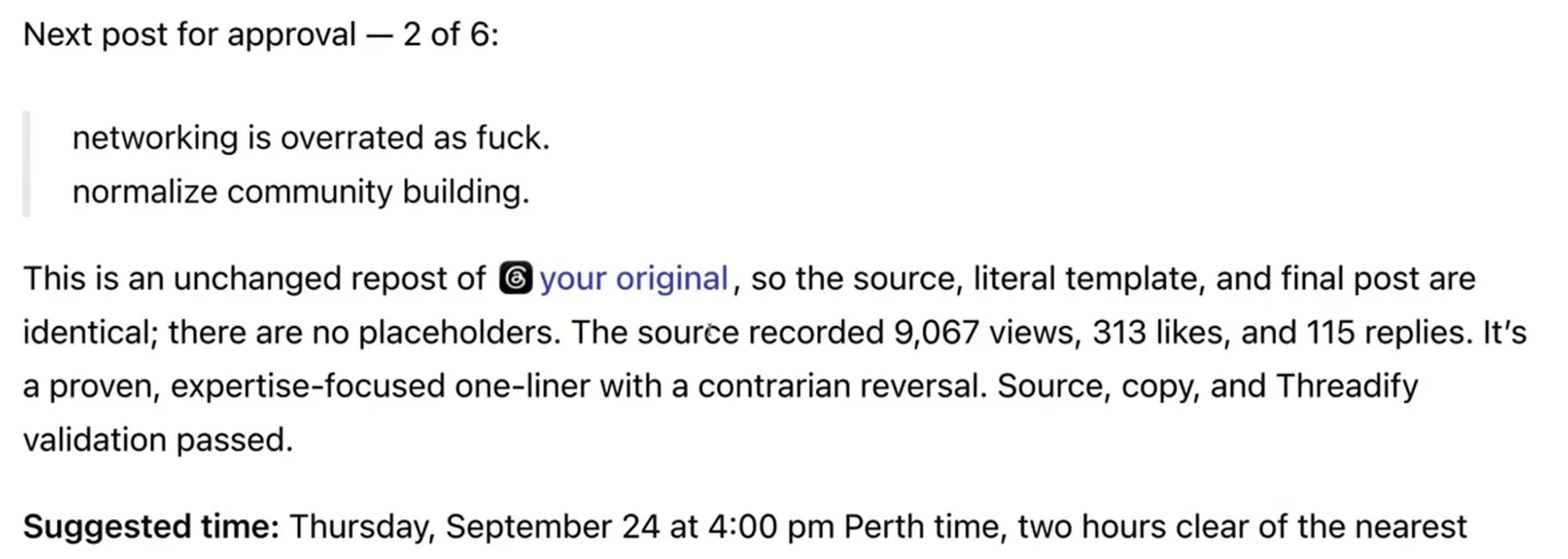
Card 2 of 6. Look for the note that it's an unchanged repost, the source's views, likes and replies, and the suggested time at the bottom.
Step 5: Approve and schedule, then move straight to the next post
One short reply schedules the post and brings up the next card, so you don't need to open a calendar. Type the line shown in the screenshot: Approve that and show me the next one. In the example run, the screen then showed Worked for 5m 32s, followed by a confirmation that the post was scheduled for Thursday, September 24 at 4:00 pm Perth time. Threadify had read back the exact text, account and time, and the confirmation ends: "It has not published." Right below it sat the next card, post 3 of 6.
If a post isn't right, edit it, skip it or reject it instead. The agent remembers your decision and you move on to the next card.
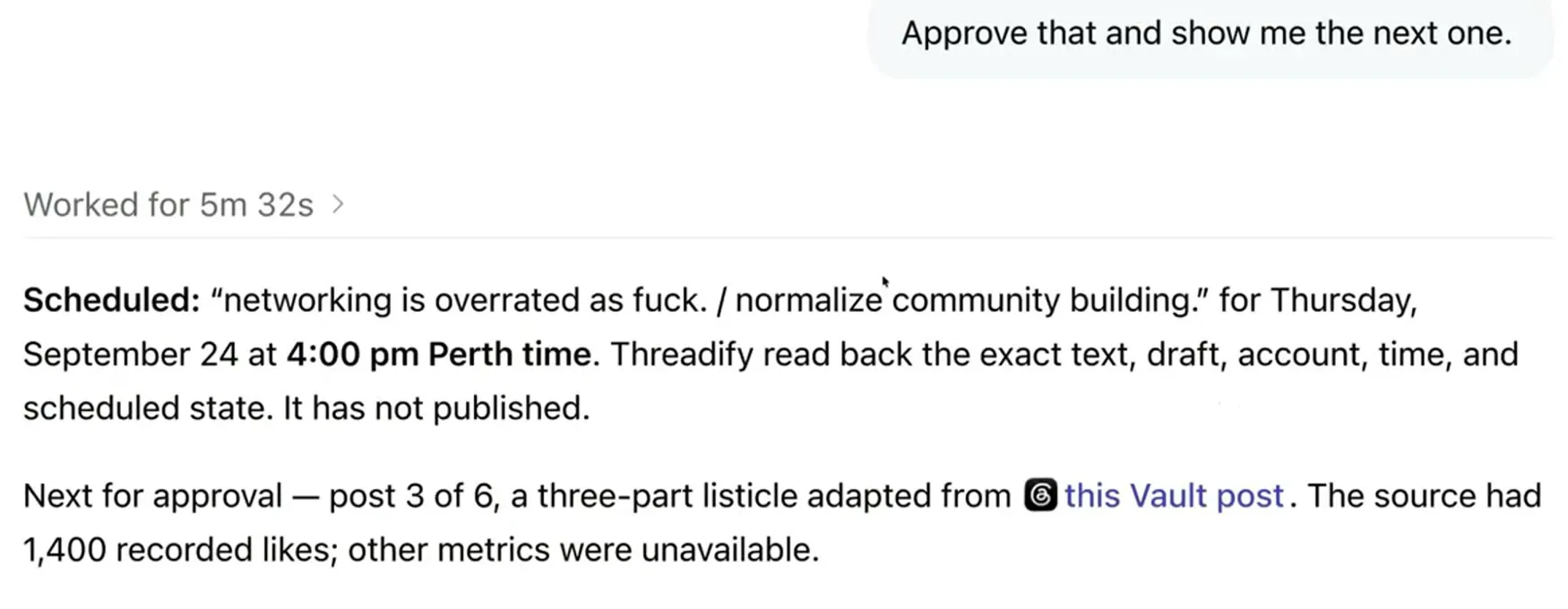
Look for the line 'It has not published' in the scheduled confirmation, then the next card, post 3 of 6, waiting underneath.
Step 6: Check the Vault-based post uses true details from your life
Posts 3 and 4 take a structure that has already worked on Threads and fill it with your material, so check every detail before you approve. In the example run, post 3 of 6 was adapted from a Vault post with 1,400 recorded likes. The agent rewrote it as a five-item list about the creator's own life, opening with "things you can finish without owing them the rest of your life." The items covered a law degree, a community, a project, a public life and an old goal. Because the agent already had context on the creator, the details were accurate.
Read every line as if a follower will check it. If one doesn't fit, tell the agent in plain words which sentence to change and what's true instead. When you're happy, schedule it the same way as in Step 5 and keep going until all six cards are done.
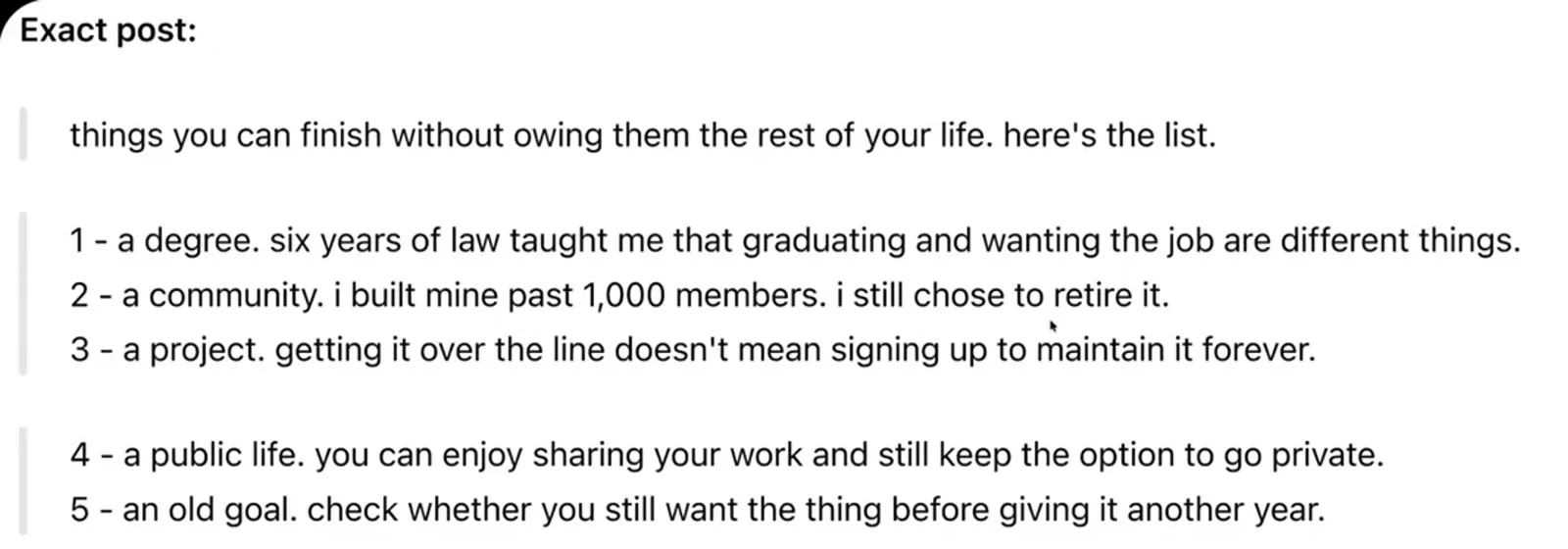
The finished list post. Notice that the hook and all five numbered items now use the creator's own experience.
How many of the six posts should you review each day?
All six. The example run only reviewed three, but going through the full six gives the plan its best chance of growing your following over the 30 days. In that run, the day's first post, an earlier post that had performed really well, was scheduled for 11 pm Perth time that night.
What to expect: will the 30-day plan grow your Threads account?
It might. Before you start, know where it falls short:
- It won't get every post right. Some days you'll want to change a sentence or two, or skip a card altogether. Give feedback in plain words and the agent adjusts that post.
- The example run's results aren't a promise. Over its 30 days, the example account recorded about 1.4 million views and around 738 new followers. The creator completed about 15 to 20 of the 30 days. Your niche, audience and posts are different, so your numbers will be too.
- Repeating your best posts is part of the design. If you dislike that, skip or reject those cards, or rework the posts instead.
- You decide what goes out. Nothing is scheduled without your approval, which also means nothing is scheduled on days you don't open the queue.
- The daily mix is fixed. If you'd rather have five posts lined up for you each morning, the workflow that lines up five Threads posts every morning may suit you better.
Start your 30-day Threads posting plan this week
Deciding what to post every day is the part that wears you down, and this plan gives that job to your agent while you keep the final say. Open Threadify and connect your agent, then send the install message from Step 2. Once the routine is set, each day's first post will be waiting for you to review.
Frequently Asked Questions
Will my AI agent publish anything without asking me first?+
No. Every post waits on a card until you approve it. When you approve, the agent schedules the post and confirms the date and time, and the confirmation says the post hasn't published yet. You can also edit, skip or reject any card.
Why would I repost my best Threads posts?+
A post that already did well has shown it works, so the plan gives it another run instead of leaving it buried in your history. The first two posts each day come from your own best posts, and they can come through word for word. If you'd rather not repeat them, skip or reject those cards.
What is the Threadify Vault?+
It's a bank of viral Threads posts that passed a thousand likes. The 30-day plan uses the structure of those posts for two of each day's six, then rewrites them with your own details. Check each one is true for you before you approve it.
Can I change what time the 30-day plan runs?+
Yes. Ask your agent in plain words, for example to run it every day at 7 a.m. or every second day. Also check that the time zone shown on Threadify's Agent tab matches where you live, because your agent uses it whenever it reads or sets a time.
Which AI agents work with this workflow?+
You can connect Threadify to Claude, ChatGPT or Gemini from the Agent tab. Agent connections come with every paid plan, and your agent's work uses the same monthly credits as the app.
Try Threadify for free
Write better Threads in less time. Generate, refine, schedule—without the chaos.