
Turn One Plain Idea Into 3 Scheduled Threads Posts (No Code)
Tired of AI drafts that read flat? Let your agent interview you about tomorrow's post, have Threadify write a thread, a listicle and a one-liner from your numbers, then schedule all three.

You've got a rough idea for tomorrow's Threads post, so you ask your AI agent to write it. What comes back could have been written by anyone: no real numbers, no shape, and a "long-form" post that's really one block of text. You rewrite it line by line. Then you remember the rest of the week still needs posts, and the evening has gone. Tomorrow you post something safe and forgettable again, or you skip the day.
The fix is to let the agent ask you questions before a word gets written, then hand the writing to Threadify, which can see your own Threads numbers. You don't need to code. A skill is a set of instructions saved inside your agent that it follows whenever you call on it, and you add this one by pasting a single message. (For why plain AI drafts sound hollow in the first place, see why AI content still sounds fake.)
What you need before you start
- A Threadify account with your Threads account connected. Agent connections come with every paid plan.
- An AI agent, such as Claude or ChatGPT.
- One rough idea for tomorrow's post. Half-formed is fine, because the interview fills in the rest.
- Optional: any hook rules you write by, saved in Threadify, so the agent can find them in step 4.
How to turn one idea into 3 scheduled Threads posts (5 steps)
Step 1: Let your AI agent work inside your Threadify account
This step lets your agent read your numbers and put posts on your calendar. Sign in to Threadify, open the Agent tab at the top of the page and scroll to the bottom, where each agent has its own setup card. For Claude, click Copy on the Claude card, then follow the three numbered steps under it: in Claude, open Settings → Connectors → Add custom connector, name it Threadify, paste the link and leave Client ID / Secret blank. Claude opens your browser, where you log in and click Allow. For a fuller walkthrough, see how to connect Claude to Threads with Threadify.
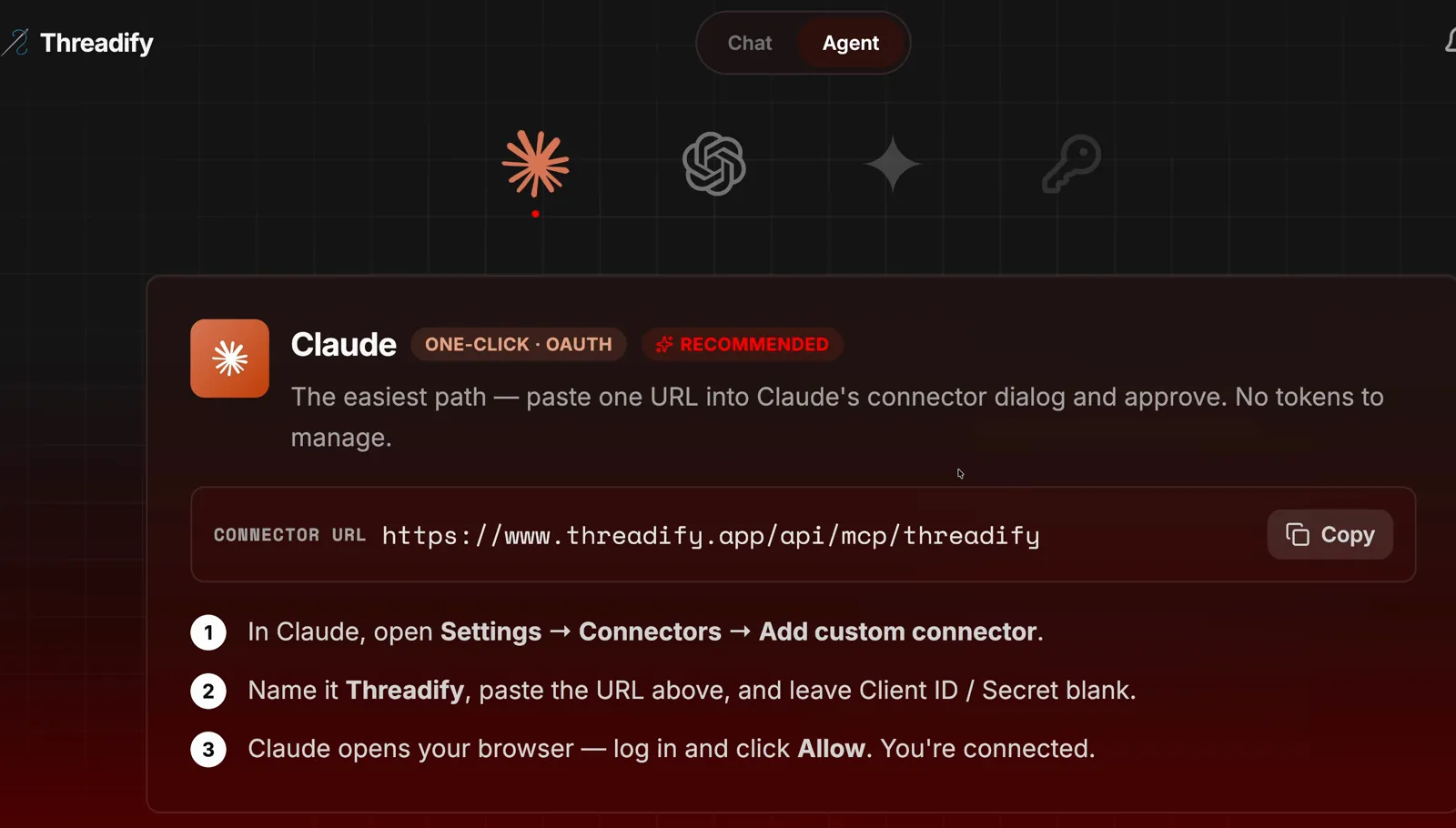
The Agent tab's Claude card: the link to copy with the Copy button, and the three numbered setup steps underneath.
Step 2: Add the interview skill with one message
This gives you a free, ready-made workflow without setting anything up yourself. Start a new chat with your agent and paste this:
https://github.com/lennoxsaint/Threadify-workflows
install this github repo and run the Threadify grill-to-post skill
The link points your agent to Threadify's free workflows, and the sentence tells it which one to add and start.
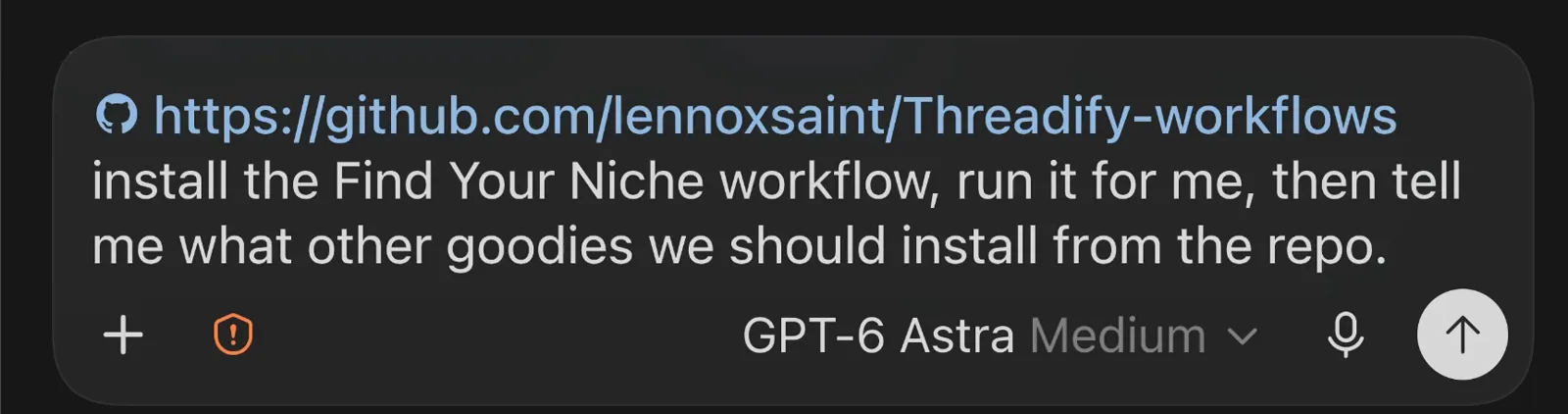
The same install pattern: the free workflows link, then one plain sentence. This example names a different workflow, so use the grill-to-post wording above.
Step 3: Let the agent interview you about tomorrow's post
This is where a vague idea becomes a clear one. Tell the agent what you want to post about, and ask it to question you rather than write:
I want to post on Threads tomorrow about [your idea]. Grill me until we both know exactly what I'm saying and who it's for. Don't write it for me.
In the example run, the agent asked who the post was for, what one thing the creator's top posts had in common, what readers should do once they'd finished, and which number would carry the post. Those are the questions that get skipped when you rush a draft at night.
Try Threadify for free
Write better Threads in less time. Generate, refine, schedule—without the chaos.
If the questions arrive as one long chat message, type the short line shown at the top of the screenshot below. The agent then asks the same questions as a click-through interview, with a recommended answer you can pick or replace with your own.
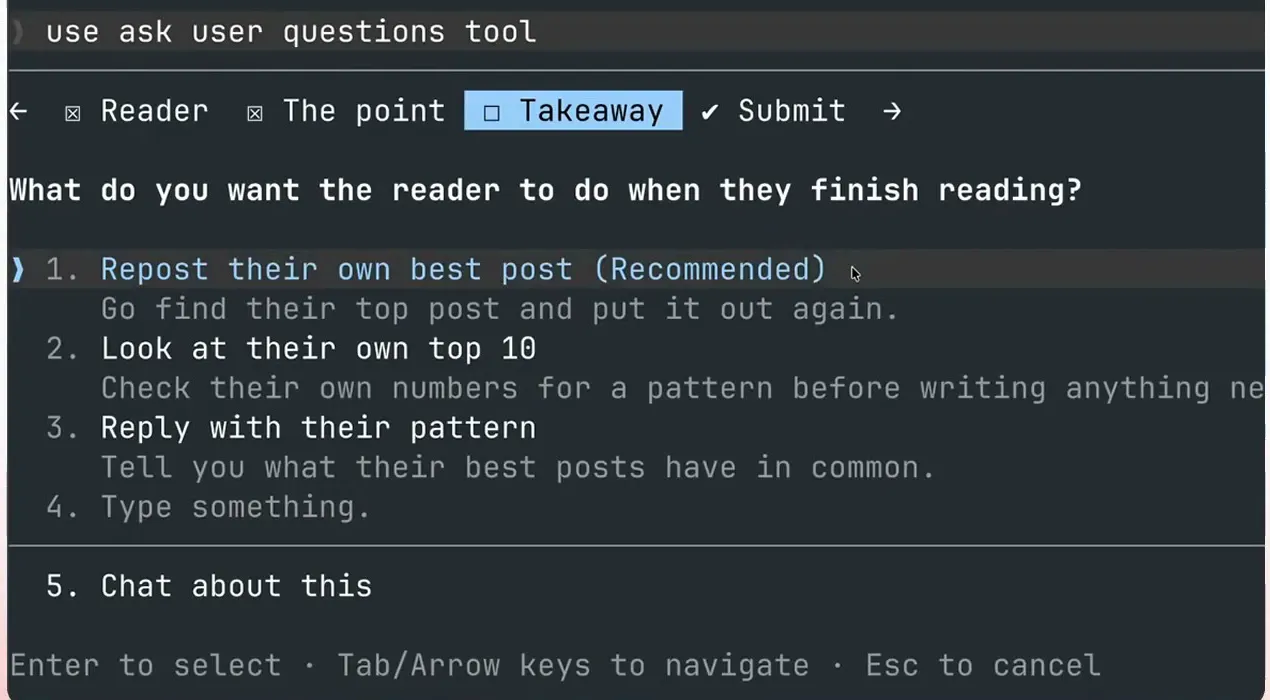
The click-through interview: tabs for Reader, The point and Takeaway, and a recommended answer to "What do you want the reader to do when they finish reading?"
Once you've answered everything, tell the agent which formats you want. The example run asked for three: a long-form post, a listicle (a numbered-list post) and a short one-liner.
Create three different posts for tomorrow: one long form, one listicle and one short one-liner.
Step 4: Have Threadify write the posts from your real numbers
This is where your own results go into the posts. Your agent may offer drafts of its own first. In the example run, those came out flat even with a document describing your voice and another listing writing habits to avoid both loaded, and the "long form" one had no formatting at all. So hand the writing to Threadify:
I need you to use Threadify to generate the posts themselves.
Threadify can see your Threads analytics, so it can use your real figures. In the example run, the listicle gave exact view counts for the three times one post went out: 1,104,736 in December 2024, 660,722 in June 2025 and 1,684,246 in October 2025.
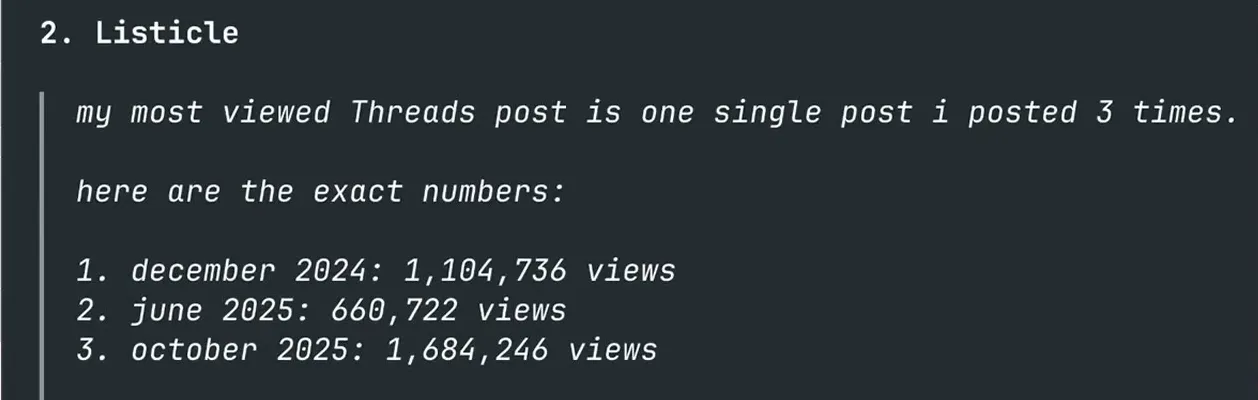
The listicle Threadify wrote, using the example account's exact view counts for each time the post went out.
The hook decides whether anyone reads the rest, so ask for ten versions that follow your own hook rules (a loop is a teaser that makes readers want the answer. The example run's rule was one loop in the first line and one in the last line of the hook, which gets people to tap through to the rest of the post), then pick your favourite. For hook writing itself, see how to write a hook that stops the scroll.
Give me 10 different versions of the hook. Make sure that they use my hook principles about opening two different loops and then rank them from best to worst for me.
Step 5: Schedule all three at your best times and check the calendar
This puts all three posts on your calendar as scheduled posts, so you can still read them before they go out. Tell the agent which hook you picked (swap 10 for its number) and ask it to schedule:
Use hook 10 in the Thread draft and then go and schedule all of those at the best time to post tomorrow.
The agent schedules the posts, then reads your calendar back. In the example run, it gave a table of day, time, post and the reason for each slot. The request said "tomorrow", but the agent spread the posts over three days (times in Perth): the thread of 6 posts on Sat 3 Oct at 9:00 am, the listicle on Sun 4 Oct at 8:00 pm and the one-liner on Mon 5 Oct at 8:00 pm. If the table isn't what you wanted, tell the agent. Then read each post before its slot comes round, and check that any numbers match your own analytics.
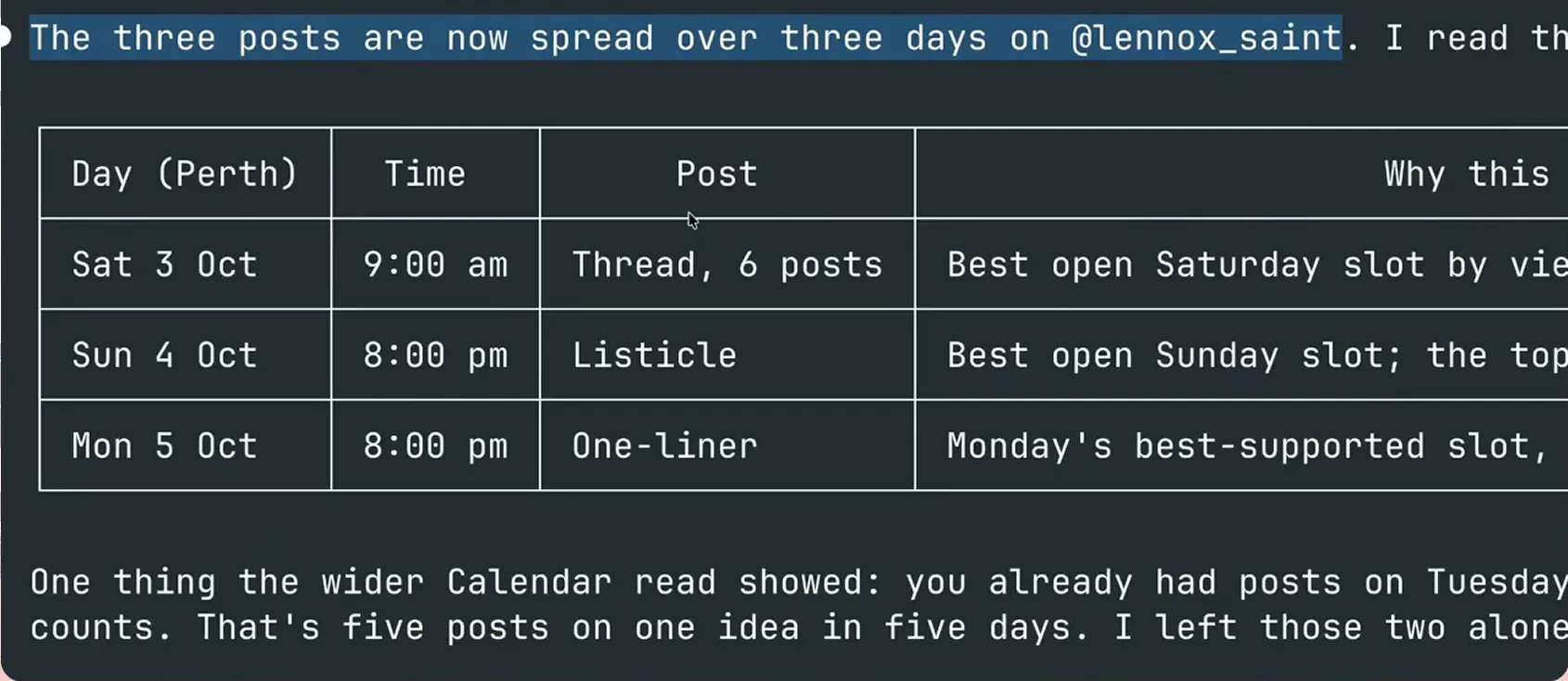
The agent's read-back: three posts across three days, with the day, time, post and the reason for each slot.
What to expect from your first run
The agent's own drafts may disappoint. In the example run, plain agent output read flat even with a voice document loaded, which is why step 4 hands the writing to Threadify. If you keep the agent's version, expect to rewrite it.
Check the schedule table before you accept it. In the example run, the agent found posts already on the calendar, pointed out that this made "five posts on one idea in five days" and left the existing two alone. Your calendar may need a different call.
The posts are only as specific as your answers, so give the interview real attention. If you'd rather have posts waiting each morning without being questioned, the daily five-post workflow is the better fit. If you'd rather write the three formats yourself, the Modular Thread Stack shows the manual method.
Plan tomorrow's posts tonight
Threadify writes the posts from your own numbers and puts them on your calendar, so your agent needs to reach your account first. Open Threadify and connect your agent, then run your next idea through the interview and turn it into three scheduled posts.
Frequently Asked Questions
Do I need to know how to code to use Claude skills for Threads?+
No. You install the skill by pasting the free workflows link and one plain sentence into your agent. After that you answer its questions and type short requests.
Will the agent publish anything without asking me?+
The last step asks the agent to schedule the posts, not publish them. In the example run, all three posts were scheduled rather than published, and the agent read the calendar back so the times could be checked first.
Can I use ChatGPT instead of Claude?+
Yes. The Agent tab in Threadify has setup steps for each supported agent, including Claude and ChatGPT. Pick the card for the agent you use and follow its steps. The click-through interview in step 3 was shown in Claude.
What if my numbers are much smaller than the example account's?+
That's fine. Threadify writes from your own analytics, so your posts use your own figures. The example account's view counts show how the workflow uses real numbers. They aren't a forecast for your posts.
Try Threadify for free
Write better Threads in less time. Generate, refine, schedule—without the chaos.