
Turn Your Threads Comments Into a Sales Pipeline With Your AI Agent
Your Threads comments hold buyer signals, buried under 'great post!' noise. Your AI agent can sort them, run an optional capped company search and draft seven posts for you to approve.

You post something useful and the replies roll in. "Great post!" "Good job." Somewhere in that pile, one person described the exact problem you solve, the kind of comment that could have become a sales conversation. You never saw it. Finding it would have meant scrolling every thread, and even then you'd still have to work out what to post about it. So you post something generic again, and the person who almost asked drifts off.
This guide is for creators already posting on Threads with something to sell (or an offer in mind). It shows you how to hand that digging to your AI agent. The agent reads your comments, separates buyer signals from everyday praise and can research companies in your market for a capped fee you approve first. Then it writes seven drafts tied to your offer and schedules the one you pick. Nothing paid or public happens without your approval.
If you only want one post idea from your comments, without the market research, start with letting your AI agent find your next post in your Threads comments. This guide adds the optional paid research, the check on which companies fit your offer, and scheduling at your best time.
What you need before you start
- A Threadify account with your Threads account connected. Agent connections come with every paid plan. The best-time scheduling in Step 7 uses Best Time to Post, which comes with the Founder and Operator plans.
- An AI agent app you already use, such as Claude, ChatGPT or Gemini.
- Your offer saved in Threadify, or an offer idea. If you don't have one yet, you can talk it through with your agent first.
- Optionally, Treg, a separate research tool that charges per use. You connect it to your agent and pay for what you use. The message in Step 2 asks your agent to walk you through it, and you can skip Treg entirely and spend nothing.
How to turn your Threads comments into a sales pipeline with your AI agent (8 steps)
Step 1: Give your agent access to your Threads account
Your agent can only read your comments and schedule posts once it's connected to Threadify. Sign in to Threadify (Google sign-in works), connect your Threads account and open the Agent tab at the top. Scroll down, choose your agent app (Claude, ChatGPT, Gemini or another) and follow the numbered steps on screen.
For Claude, click Copy next to the link Threadify shows. Then, in Claude, open Settings → Connectors → Add custom connector, name it Threadify, paste the link and leave Client ID / Secret blank. Your browser opens; log in and click Allow. For the full walkthrough, see how to connect Claude to Threads with Threadify.
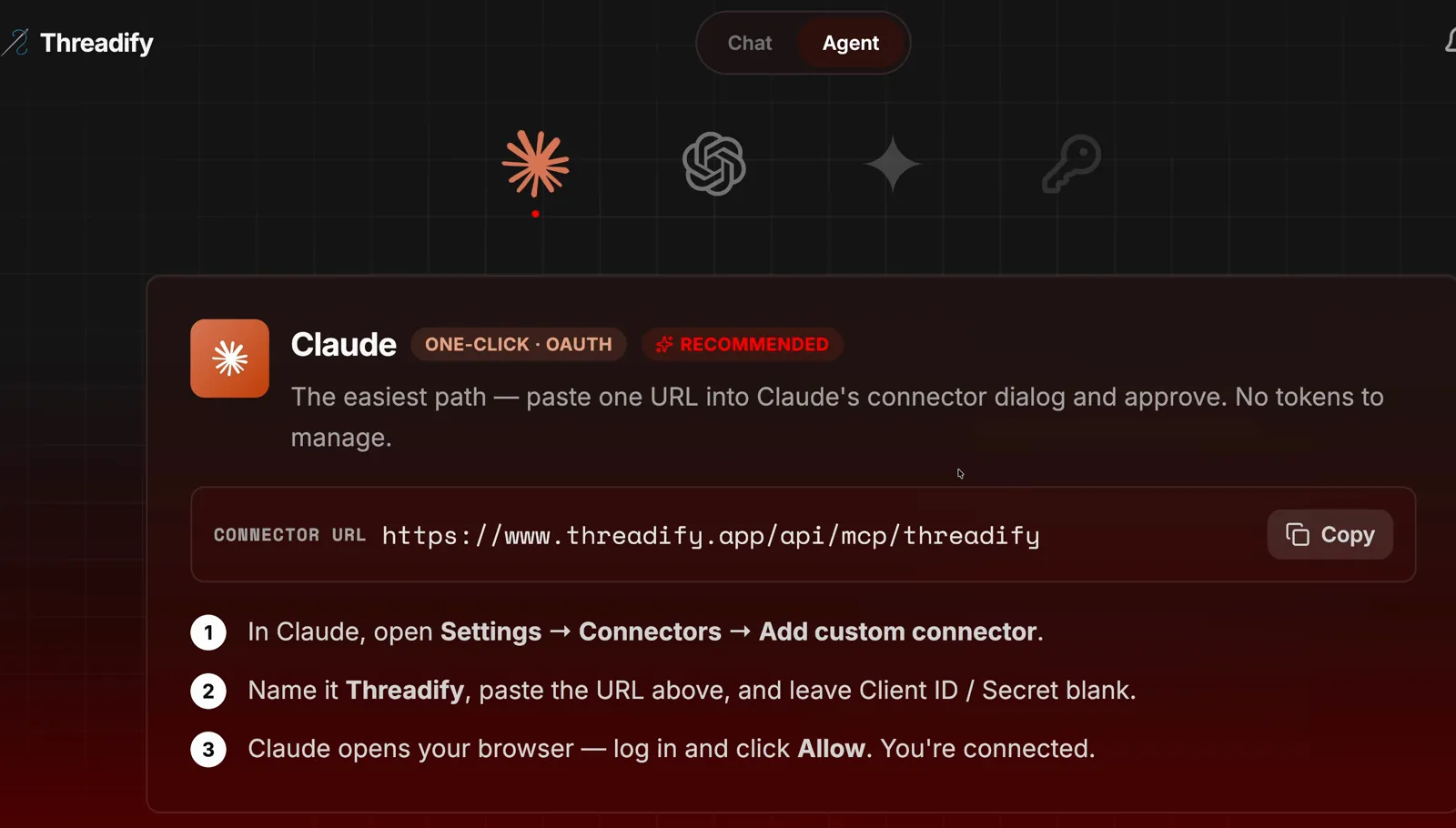
Threadify's Agent tab with the Claude card. Notice the Copy button beside the link and the three numbered setup steps underneath.
Step 2: Start Market to Pipeline with one message
This one message installs the free workflow and starts it running. Open a new chat in your agent app and type the message shown in the screenshot below, exactly as it appears. It's the free workflows link, then one sentence asking your agent to install the workflows and run Market to Pipeline using Threadify, with help setting up Treg.
Don't fancy retyping a link? Save the screenshot and drop it into your agent's message box instead.

The whole starting message. Notice it is just the free workflows link followed by one sentence asking for the install and the run.
Step 3: Let your agent separate buyer signals from "great post!" replies
Now you can stop scrolling every thread yourself. Your agent first confirms which Threads account it's reading, lists the offers you've saved in Threadify and reads through your comments. Then it sorts them. General praise doesn't show that someone needs what you sell, while a comment describing a real problem your offer solves deserves a closer look.
In the example run, the agent counted praise for an AI model as ordinary engagement, since it didn't show that anyone needed Threadify. Specific problems with creating content or turning conversations into business were what it called worth a closer look. If you'd like to judge intent yourself too, try this red, amber and green method for spotting buyer intent in Threads replies.

Notice the agent confirming which account it's reading before it explains which comments count as buyer signals and which are ordinary engagement.
Try Threadify for free
Write better Threads in less time. Generate, refine, schedule—without the chaos.
Step 4: Approve the company search, or skip it and spend nothing
This is where you get outside market research, and you see the price before anything is charged. Before any paid research, the workflow stops and asks you. Your agent tells you what Treg charges, suggests a spending cap and gives you two choices: Approve one search, up to US$0.02 or Use existing research, no new spend.
In the example run, Treg listed its company search at US$0.007 for up to 10 results, and the agent asked to approve one search with a US$0.02 maximum. To go ahead, pick the first option or reply:
Yes, I approve that.
If you choose the no-spend option, the workflow carries on with the evidence already collected from your comments.
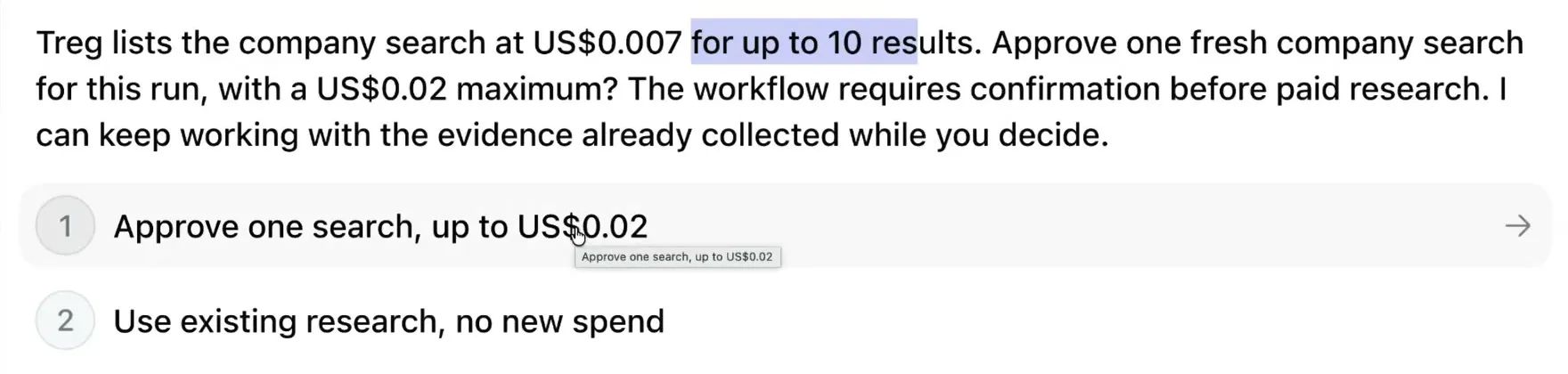
The approval question. Notice the price, the US$0.02 cap and the second option to use existing research with no new spend.
Step 5: See which companies actually fit your offer
This step narrows the search results to companies that show signs of needing what you sell. After the search, your agent reports what came back and what it cost, then checks which companies actually fit. In the example run, the search returned 10 companies and cost US$0.007. The agent set a clear bar: producing content only makes a company worth considering, and it earns a spot only when there's evidence it needs your offer.
The agent then links what it found to your offer, so the drafts stay relevant to people you can actually help.

Notice the number of companies returned, the US$0.007 cost, and the line about what earns a company a place.
Step 6: Review seven drafts and choose the one worth posting
You get seven angles to choose from. Your agent writes seven drafts inside Threadify, built from the problems in your comments and the research. Read them all, highlight the one you want and tell your agent. You can add a note in the Add an optional comment... box.
In the example run, draft 6 was chosen: a short post comparing a carefully polished post that got no replies with a quick one that asked a specific question, ending with a question for readers.
Read each draft for accuracy, too. Draft 6 mentions 12 likes and a post written in 30 seconds. Treat details like these as examples to check, and change any figure or timing that isn't true for you before you schedule.
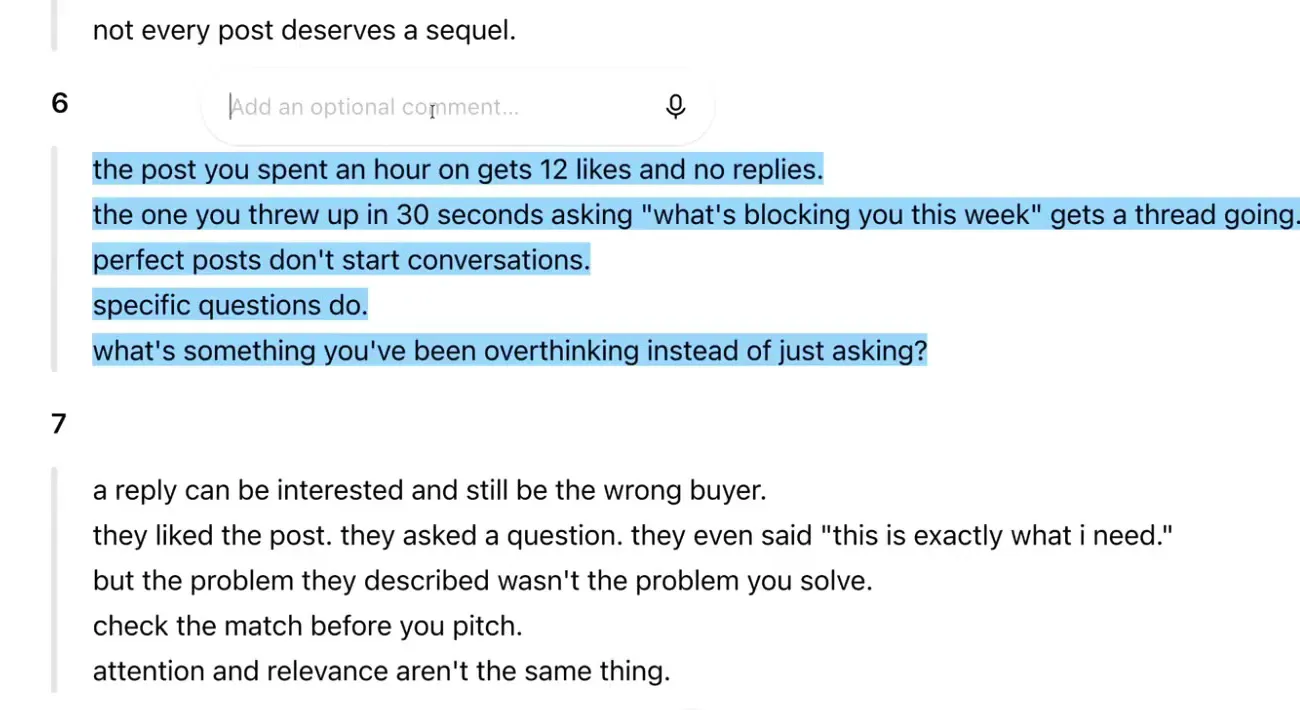
Notice draft 6 highlighted with the optional comment box open on it, and draft 7 starting below.
Step 7: Schedule your pick at your best time to post
This step gets your post out when your own history says engagement is strongest, so you don't have to guess. Tell your agent:
Post that at the best time to post over the next 24 hours.
Your agent uses Threadify's Best Time to Post (on the Founder and Operator plans), which reads your posting history. How far back it looks depends on your plan. It then schedules the post and confirms the slot. In the example run, the post was scheduled unchanged for 12:30 a.m. on the example account, and the agent explained: "That's the strongest historical engagement slot within your next 24 hours." Expect a different slot on your account, because it comes from your own history.
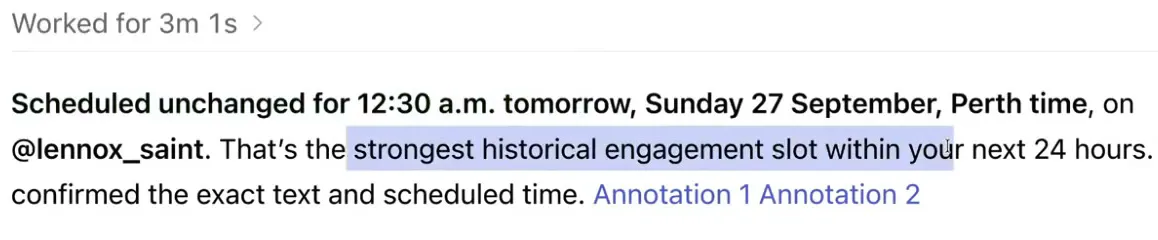
Notice 'Scheduled unchanged' with the 12:30 a.m. slot and the agent's reason underneath.
Step 8: Check the run summary to see exactly what was done
The summary shows what your agent read, why it read it and what it produced, so you can confirm the run did what you asked. In the example run, the summary listed 6 selected comment threads and 60 posts reviewed to find the problems people already ask about, then 7 original drafts leading to 1 approved post scheduled.
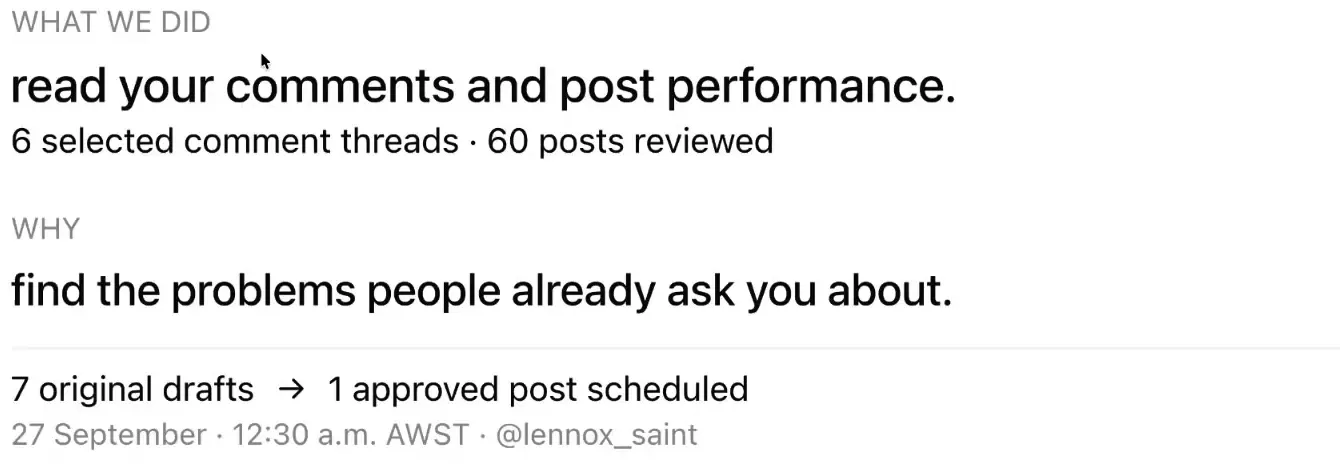
The run summary. Notice what was read, why, and the result: 7 drafts, 1 approved post scheduled.
What to expect from your first run (and when to skip the paid search)
- Research costs money only if you say yes. Treg sets its own prices, so read the amount and cap your agent shows you each time, or choose Use existing research, no new spend.
- Nothing goes out until you pick it. The drafts stay drafts until you choose one and ask for it to be scheduled.
- If your comment section is quiet, your agent has less to sort. When recent posts got few replies, the buyer signals will be thin, so focus on starting conversations first with this Threads lead generation system.
Find the buyers in your comments this week
Your comments probably hold buyer signals you've scrolled past. Connect your AI agent to Threadify and run Market to Pipeline on your own replies. You'll get seven drafts built from what your audience actually asks, and you approve every search and every post.
Frequently Asked Questions
How much does the Treg company search cost?+
Treg charges per use, and the workflow shows you the price and a spending cap before anything is charged. In the example run, Treg listed one company search at US$0.007 for up to 10 results, and the agent asked for approval with a US$0.02 maximum. Treg sets its own prices, so check the amount shown on your run.
Do I need Treg to run Market to Pipeline?+
No. When the agent asks about paid research, choose 'Use existing research, no new spend' and the workflow carries on with the evidence from your comments.
Will my AI agent post anything without asking me?+
No. Nothing paid or public happens without your approval. You choose which draft to use and ask your agent to schedule it.
Which Threadify plan do I need?+
Agent connections come with every paid Threadify plan. Best Time to Post, which the scheduling step uses, comes with the Founder and Operator plans.
Which AI agent apps can I use?+
In Threadify's Agent tab you can choose Claude, ChatGPT, Gemini or another agent app and follow the setup steps on screen.
Is 12:30 a.m. a good time to post on Threads?+
Not necessarily for you. That slot came from the example account's own engagement history. Best Time to Post reads your posting history, so your agent will pick a slot that fits your account.
Try Threadify for free
Write better Threads in less time. Generate, refine, schedule—without the chaos.