
Let 20 Cheap AI Agents Find What Wins in Your Threads Niche
Tally niche posts by hand and you've lost count within the hour, and one AI can miscount too. Race cheap agents against one big model, recount every claim with a script, then schedule the post.

You have a hunch about what works in your niche. Maybe the top posts all seem to open with a question, or the money posts always quote a dollar figure. So you scroll Threads, screenshot post after post and keep a tally in your notes app. An hour later you've lost count, the tally is half finished, and you post on the hunch anyway.
So you hand the job to an AI. It comes back sounding certain about how many of the top posts use line breaks or talk to the reader as "you". But you can't tell whether it counted properly, and you're about to build a public post on that number. If it's wrong, the first person who counts for themselves will say so in your replies.
This workflow does the research and takes the guessing out of it. A crowd of small, cheap Claude Haiku agents and one bigger Claude Opus agent read the same top posts from your niche. A script then counts every pattern again, and Threadify writes a post using only the numbers that held up. You read it, reply yes, and it's scheduled.
If you'd rather start with your own history, find the Threads posts that still work for you. If you haven't settled on a niche yet, find your Threads niche from posts you've already written first. And if you're after this week's topics rather than post patterns, turn this week's niche trends into your own Threads post.
What you need before you start
- A Threadify account with your Threads profile connected. Agent connections come with every paid plan.
- Claude Code. This is the version of Claude that runs workflows on your computer, and both sides of the race run through it.
- Your own ScrapeCreators key. ScrapeCreators is the separate service the workflow uses to pull the posts from Threads, and the key is your personal login code for it. Each run uses about 28 of your ScrapeCreators credits.
- A niche you already post in. This workflow studies what wins inside a niche. It won't pick one for you.
How to find the post patterns that win in your Threads niche (7 steps)
Step 1: Let Claude work inside your Threadify account
Once Claude is connected, it can hand your research to Threadify to write the post and schedule it. In Threadify, open the Agent tab at the top and find the Claude card. Click Copy next to the CONNECTOR URL. In Claude, go to Settings → Connectors → Add custom connector, name it Threadify, paste the link and leave Client ID / Secret blank. Claude then opens your browser, where you log in and click Allow. The full guide to connecting Claude to Threads has more detail if you need it.
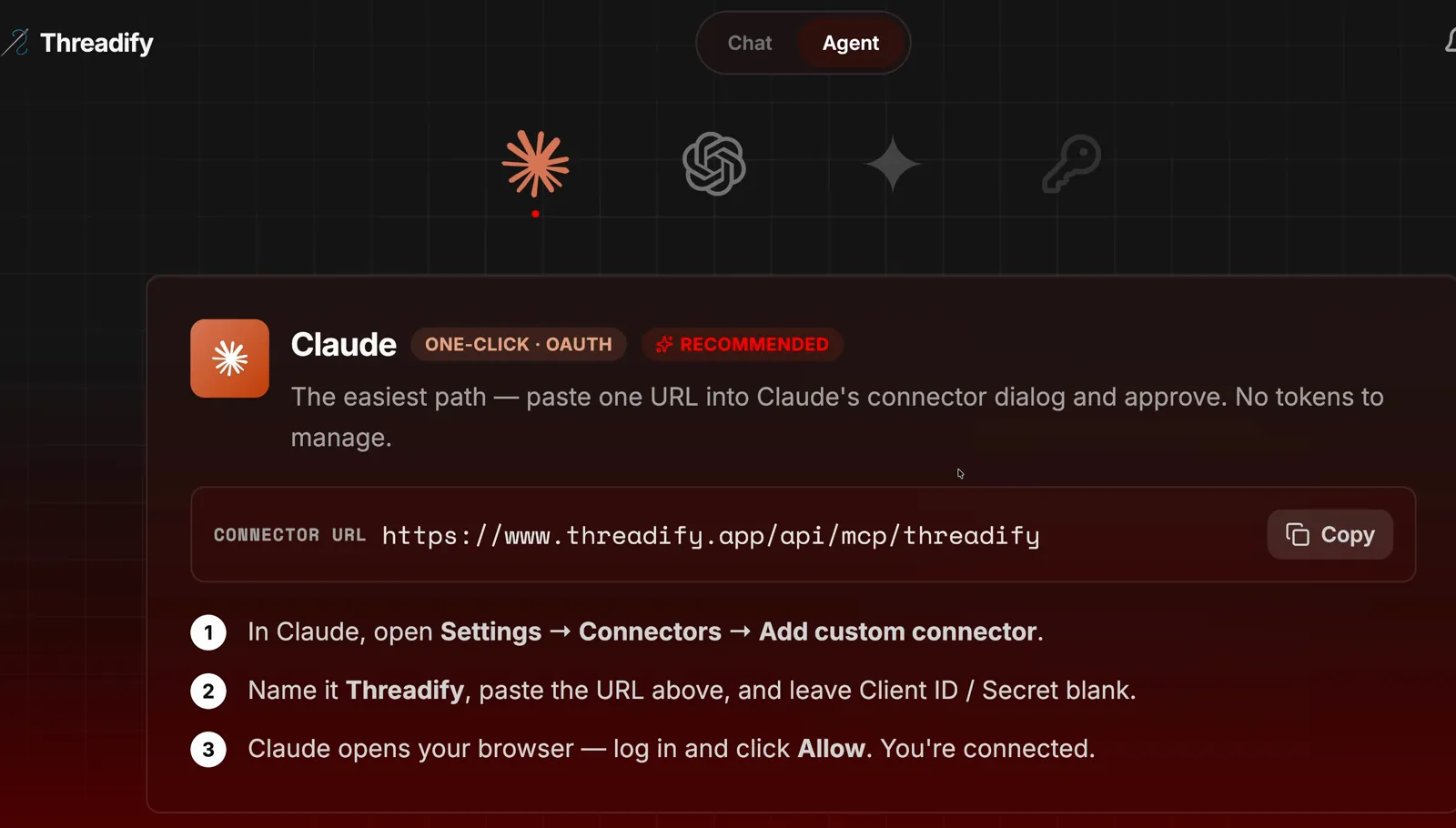
The Claude card on Threadify's Agent tab. Copy the link at the top, then follow the three numbered steps under it.
Step 2: Install the free workflows and start Research Army
You get the whole research setup without building anything yourself. Start a new chat in Claude Code, paste the free workflows link and add one plain sentence:
https://github.com/lennoxsaint/Threadify-workflows
install this run get set up and then Research Army
Press enter. That sentence tells Claude to install the workflows, run the setup workflow and then start Research Army.

An install message has this shape: the free workflows link, then one plain sentence. This example installs a different workflow, so type the Research Army sentence above instead.
Step 3: Let the race run and read the verdict
You get a one-line answer on which side won, without reading a single post yourself. First the workflow gathers posts and tidies them up. In the example run it pulled 329 posts across 28 searches, then dropped 12 duplicates, two posts older than 30 days and 48 that weren't in English, and the 100 most-liked recent posts went into the race. The race then opens in its own window, and you can let it run. When it finishes, the agent gives you the result in one line. The example run's verdict was: "Race done: the army won. Both sides backed 6 of 8 claims, and the army was cheaper."
Try Threadify for free
Write better Threads in less time. Generate, refine, schedule—without the chaos.
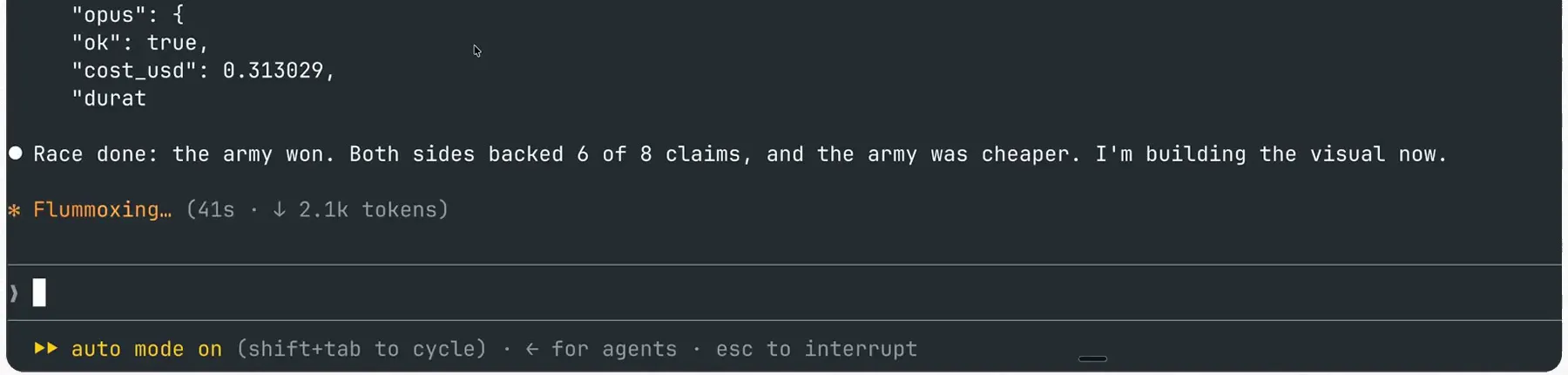
The race is over. Look for the one-line verdict under the Opus cost: who won, how many claims each side backed and which side was cheaper.
Step 4: See how 20 Haiku scouts compare with one Opus on time and runs
You can see exactly how each side split up the work and how long it took. The agent builds a race page for you. The army is 1 Haiku commander and 20 Haiku scouts working in two rounds. In round one, each scout reads 5 posts and proposes patterns, and the commander shortlists 8. In round two, every scout counts those 8 in its own batch, and the commander adds up the totals. Opus works alone and reads all 100 posts in one go. Both sides get the same brief, the same posts and read-only tools, so they can look but not change anything.
In the example run, the army finished in 76.8 seconds across 40 scout runs, and the single Opus run took 98.3 seconds. The army's runs cost 6.80 cents in total, against 31 cents for Opus. That made the army 4.6x cheaper, and it finished 21.5 seconds sooner.
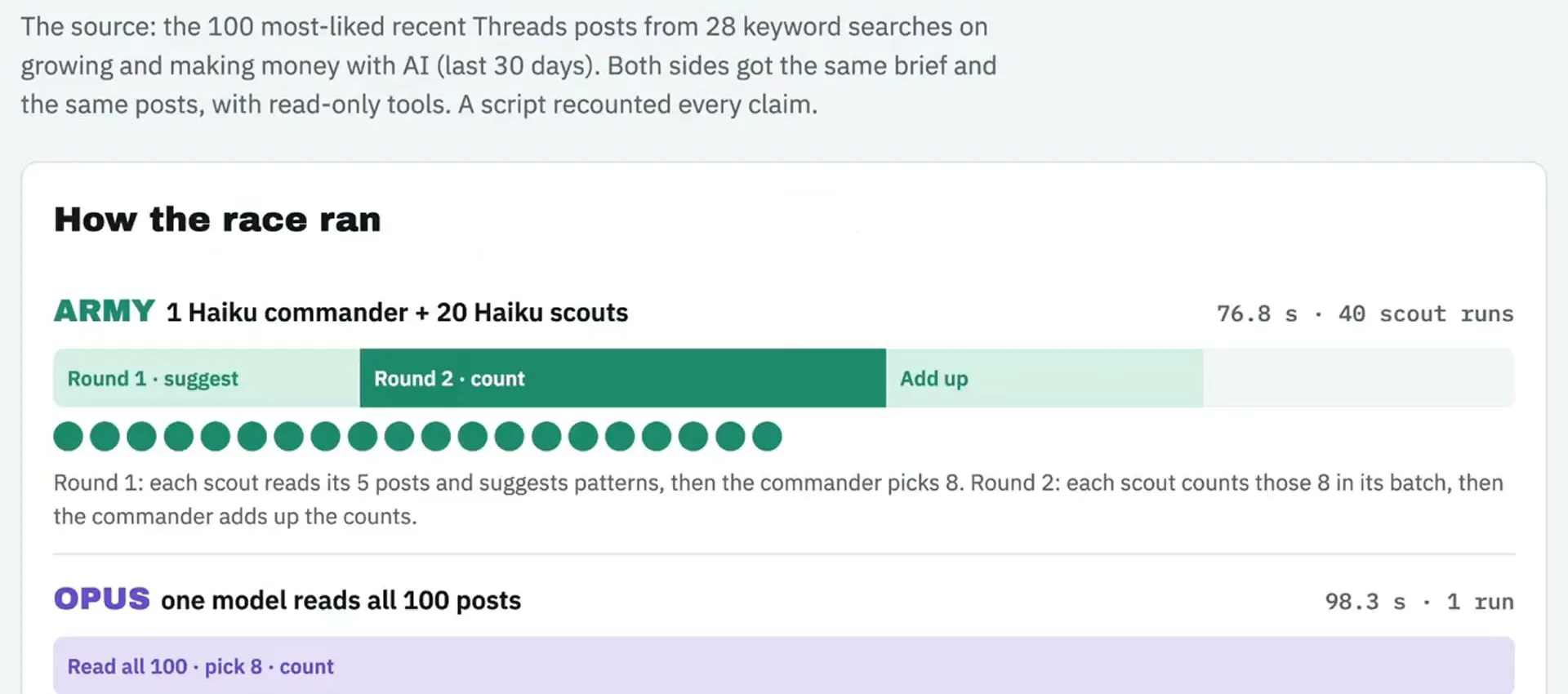
The race page. Compare the army's 76.8 s and 40 scout runs with Opus's 98.3 s and 1 run, and read how the two rounds split up the work.
Step 5: Trust only the numbers that match the recount
This step keeps a wrong stat out of your post. After the race, a script counts every pattern across all 100 posts on its own. The Every claim, recounted table puts that count next to what each side said. A claim gets a tick only when it matches the recount exactly. A dash means that side didn't pick the pattern.
In the example run, the patterns were line breaks, first person "I", talking to the reader as "you", emoji, asking a question, a dollar amount, naming an AI tool, lists and ending on a question. The army said 62 posts used line breaks and 42 spoke to the reader as "you". The recount found 61 and 44. Opus missed some too: it said 40 for "you" and 19 for asking a question, where the recount found 44 and 20.
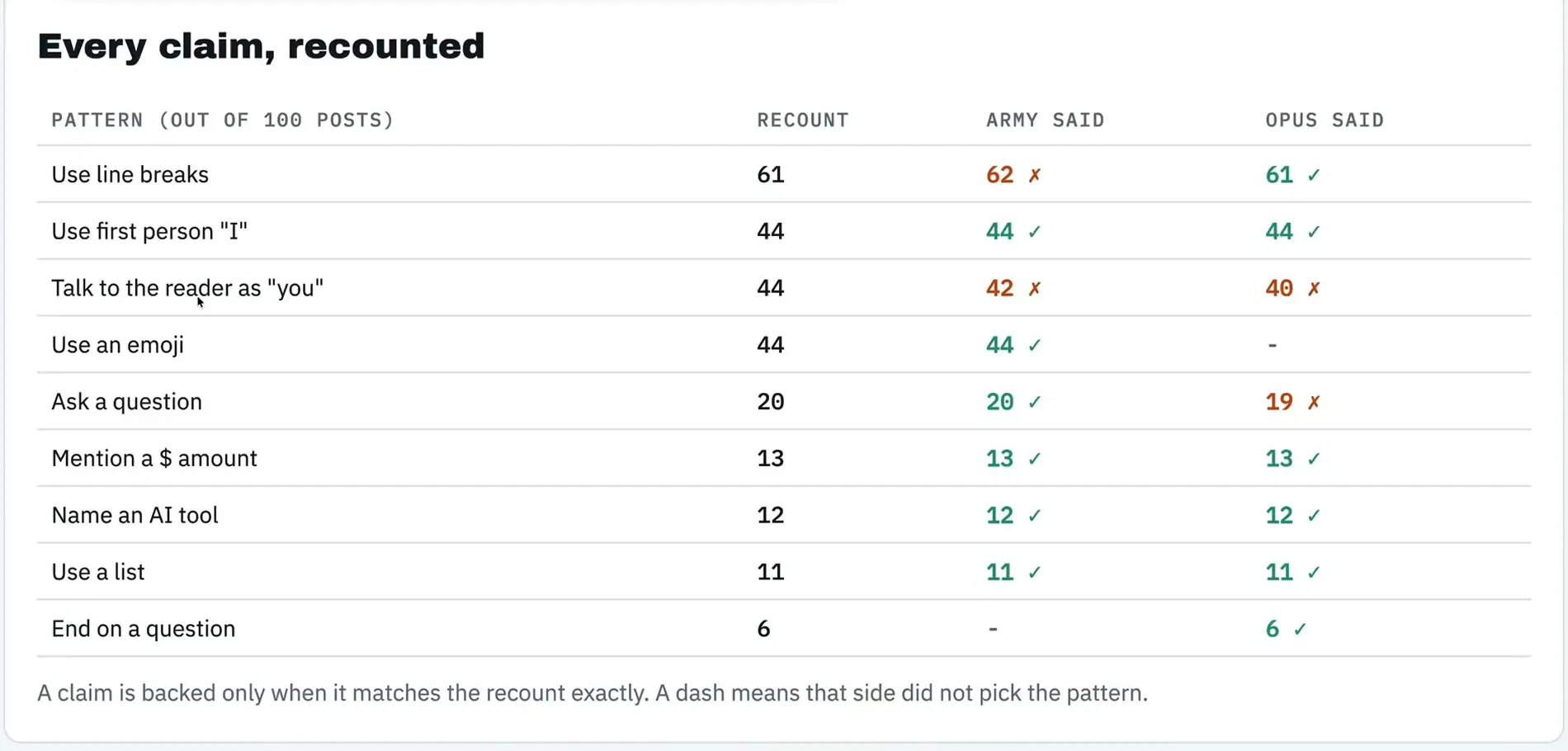
The recount table. The crosses mark counts a side got wrong, shown next to the script's own number.
Step 6: Get a post written from the checked numbers only
You get a ready draft built on numbers you can stand behind. The agent sums up the race, names any claim that failed the recount and passes the checked findings to Threadify. Threadify writes the post and runs a numbers check on it. In the example run, the summary noted that both sides backed 6 of 8 claims, so cost and time decided the winner. It flagged the army's 42 against a recount of 44 and showed check-post PASS on the draft. Threadify also checked the content calendar and suggested a good slot at 1:30 pm.
The draft used only checked counts: 12 of the 100 posts named an AI tool, 13 mentioned a dollar amount and 44 used "I". Its point was simple: "so the AI money posts that win barely talk about AI or money." Read the draft closely now. If a line doesn't sound like you, tell the agent what to change before you approve anything.
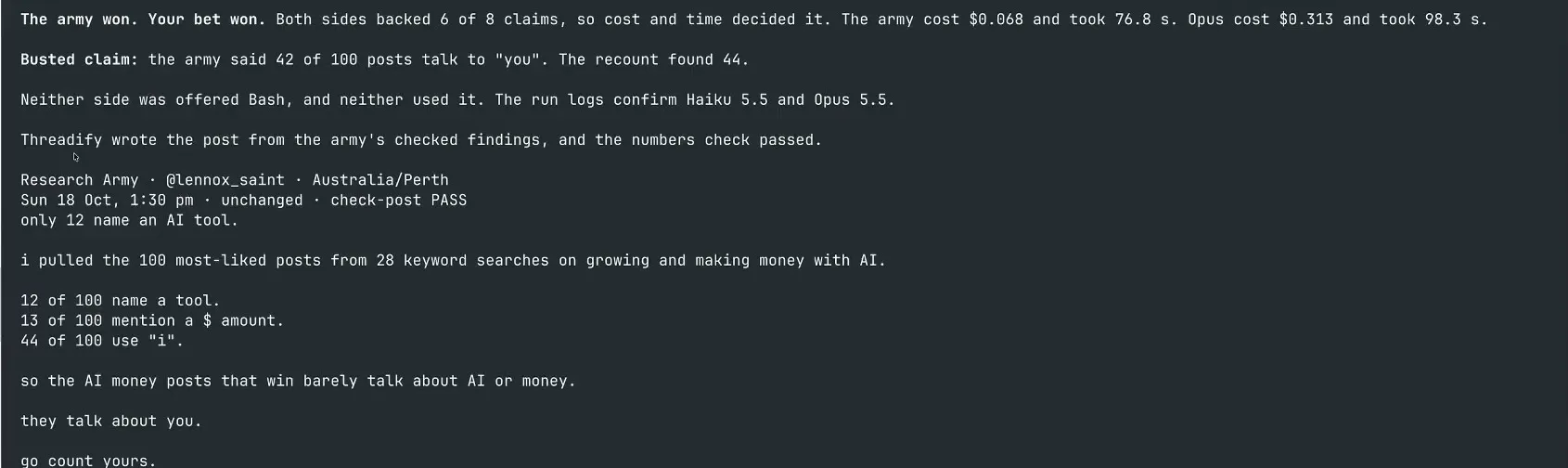
The agent's summary and the drafted post. Notice the busted claim called out by name, and check-post PASS on the draft.
Step 7: Say yes and schedule the checked post
One word puts the post on your calendar, and nothing is scheduled until you send it. When you're happy with the draft, reply:
yes
The agent confirms when and where the post will go out. In the example run it scheduled the post for Sun 18 Oct at 1:30 pm Perth, and confirmed that nothing had been published yet.

The confirmation shows the day, time and account the post is scheduled for, and a note that nothing has gone live yet.
What to expect from your first Research Army run
- Your numbers will be different. That's the point of running it on your own niche. The patterns describe your sample, not all of Threads: the example run's 100 posts came from 28 keyword searches covering the last 30 days.
- The winner can change from run to run. In the example run the two sides tied on accuracy, so cost and time decided the result. In rehearsal runs, Opus won twice and the army won once, so treat each race as one test and run it again before you decide which side suits your niche.
- Each run costs a little. The Research Army workflow is free, but the Haiku and Opus runs go through Claude Code and cost money. In the example run that was 6.80 cents for the army and 31 cents for Opus. Each run also uses ScrapeCreators credits.
- The two racing sides only read the posts, and the post only goes out after you reply yes. Check the recount table and the draft before you approve.
- This workflow won't find your niche for you. If you don't have one yet, start with your own posts instead.
Find the patterns that win in your niche this week
Open Threadify to connect your Threads account and your Claude agent. Once they're linked, your first race on your own niche can end with a checked post on your calendar, with numbers you can back up if someone counts.
Frequently Asked Questions
Do I need to know how to code to run Research Army?+
No. You paste one link and one sentence into Claude Code, read the results and reply yes to schedule. You do need Claude Code installed, plus your own ScrapeCreators key. ScrapeCreators is the separate service the workflow uses to pull the posts from Threads, and the key is your personal login code for it.
How much does a Research Army run cost?+
The workflow is free. The Haiku and Opus runs cost money through Claude. Each run also uses about 28 of your ScrapeCreators credits. ScrapeCreators is the separate service the workflow uses to pull the posts from Threads, and your key is your personal login code for it. In the example run, the army's runs cost 6.80 cents in total and the single Opus run cost 31 cents. Your costs will vary.
Will Threadify publish the post without asking me?+
No. The post is only scheduled after you reply yes. In the example run, the agent confirmed the scheduled time and said nothing had been published yet.
Are 20 cheap agents always better than one big model?+
No. In the example run both sides backed 6 of 8 claims, so cost and time decided it. In rehearsal runs, Opus won twice and the army won once. Run it on your own niche and see.
Does this look at my own posts?+
No. It studies the most-liked recent posts from keyword searches in your niche. To check your own posts against your usual results, use a workflow built for your own data instead.
Try Threadify for free
Write better Threads in less time. Generate, refine, schedule—without the chaos.