Find Your Threads Posts That Earn Clicks, Not Just Views
Your biggest Threads posts may get the fewest clicks. Rank 90 days of posts by clicks per 1,000 views, then approve three new drafts built on the pattern that works.

Why your biggest Threads posts don't bring clicks
A post takes off. The views climb past anything you've had in months and the likes keep coming. Then you open your link stats and find a handful of clicks, with no calls booked and nothing sold. Meanwhile a quiet post you nearly didn't publish sent more people to your offer than the big one did, and you never noticed.
In the example run used throughout this guide, the account had posted 568 times in 90 days and pulled 3.3 million views on Threads. One post with 102,000 views got 20 clicks. Another with 803 views got 51 clicks. Threads won't flag this for you: its insights compare a post's views with your usual numbers, but they don't show clicks.
The useful question is which of your posts make people click, and how to write more like them. This workflow answers it without you scrolling back through three months of your own profile.
The one number that shows which posts earn clicks
The number is clicks per 1,000 views. Divide a post's clicks by its views, then multiply by 1,000. That puts a post with a few hundred views and one with a hundred thousand on the same scale.
- The 102,000-view post: 20 ÷ 102,000 × 1,000 = about 0.2 clicks per 1,000 views.
- The 803-view post had 48 unique clicks (each person counted once, out of 51 total clicks): 48 ÷ 803 × 1,000 = 59.8 per 1,000 views.
You could work this out by hand, one post at a time. The workflow below gets your AI agent to do it for every post from the last 90 days at once. Threadify then drafts three new posts in the pattern that earns clicks, and nothing is scheduled until you say yes.
If you'd rather start from reach, finding the Threads posts that still get pushed is the views-side version of this check. To link a click to an actual booking or sale, see how to see which Threads posts lead to bookings or sales.
What you need before you start
- A Threadify account with your Threads account connected.
- Some posting history with links in it. Threadify tracks links in your published posts automatically (unless tracking has been switched off for your account).
- An AI agent app such as Claude, ChatGPT or Gemini, connected to Threadify. Agent connections come with every paid plan.
- An offer you want clicks for. The agent will ask which one the new posts should promote.
Running this for the first time? Do Steps 5 and 6 first. You only set them up once. After that, Steps 1 to 4 are the part you repeat.
How to find your click-earning Threads posts and write three more (6 steps)
Step 1: Start the whole check with one command
You don't have to write a prompt. In your agent app, type /money in the message box, as the screenshot shows, then select the Money Posts skill and press enter. The skill's description says what it does: it ranks your posts by clicks per 1,000 views, then schedules 3 more.
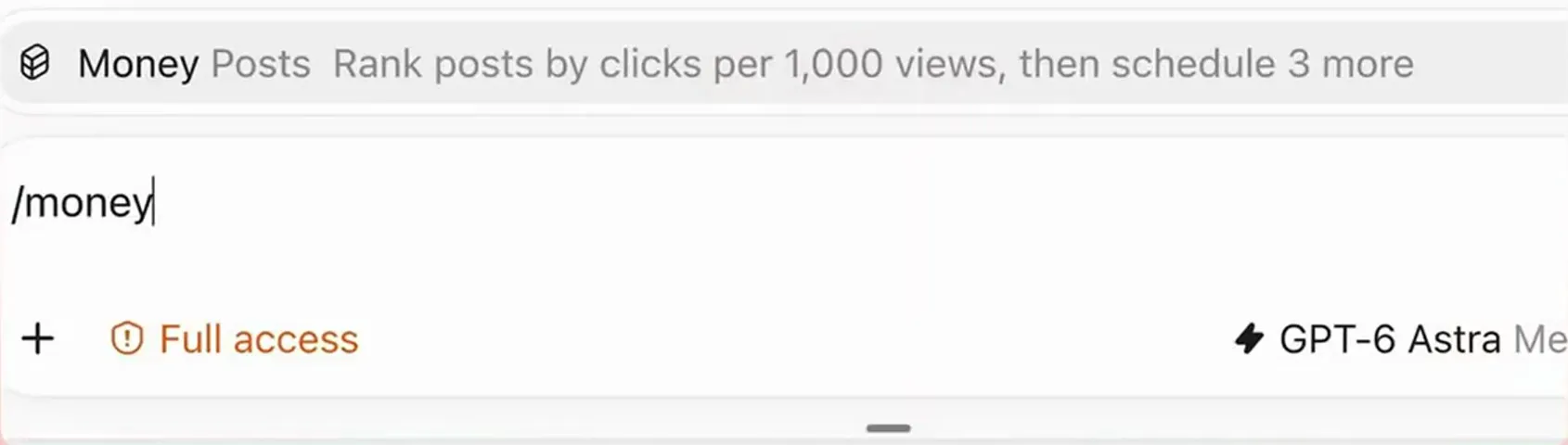
Type /money and the Money Posts skill appears, with its description: rank posts by clicks per 1,000 views, then schedule 3 more.
Step 2: Get 90 days of posts and clicks read for you
This saves you the scrolling. The agent first checks which Threads account it's working on and that link tracking is on. Then it pulls 90 days of post performance along with the clicks attributed to each post. You can watch it work through Threadify in its activity log. In the example run, the read came back with 568 posts and 94 tracked links.
Next, the agent asks which offer the new posts should promote. Threadify adds an auto plug, a short call to action for that offer, to each post, so pick the one you most want clicks for. Not sure whether an auto plug or a hand-written call to action suits that offer? Here's how the two compare.
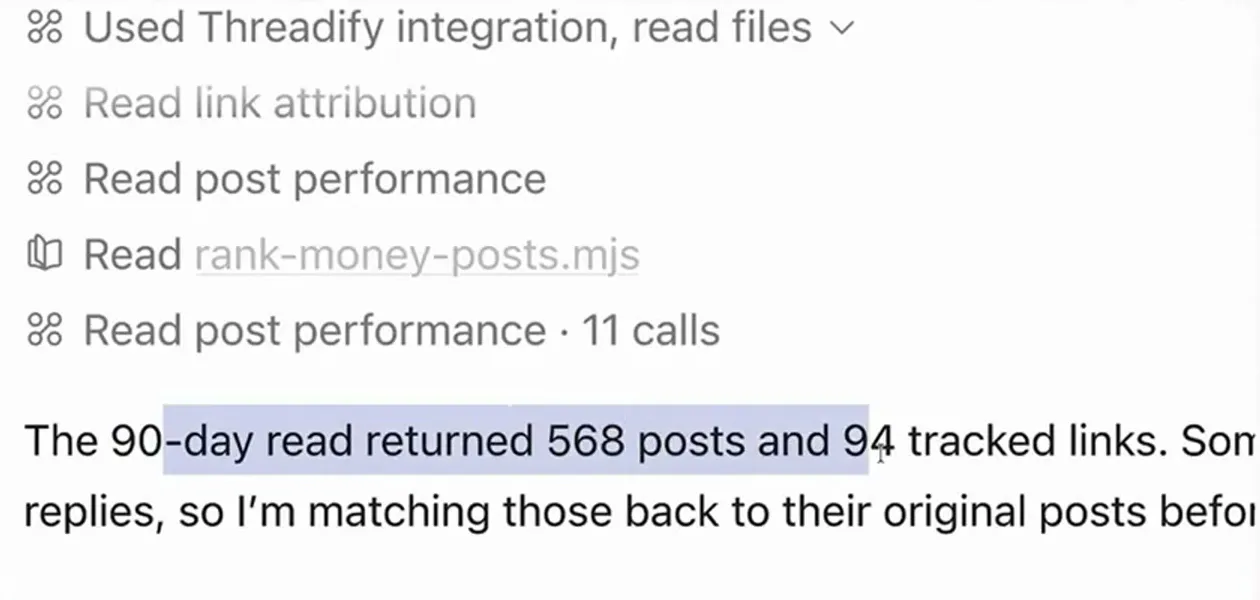
The agent's activity log, showing link attribution and post performance reads, then the result: 568 posts and 94 tracked links.
Try Threadify for free
Write better Threads in less time. Generate, refine, schedule—without the chaos.
Step 3: See which of your posts earn the most clicks per 1,000 views
You get a ranked list. The agent returns your top posts, each with its opening line, date, views, unique clicks and clicks per 1,000 views. Look at what the top few have in common as well as which one leads.
In the example ranking, the leader had only 803 views but 48 unique clicks, which works out at 59.8 per 1,000. Second place had 591 views and 32 unique clicks. The agent summed it up in one line: "The winners offered something specific: a tool, a usable prompt, or finished work." In the example run, the pattern was concrete proof first, then one specific next step. Your top posts may point to a different pattern, so use your own ranking.
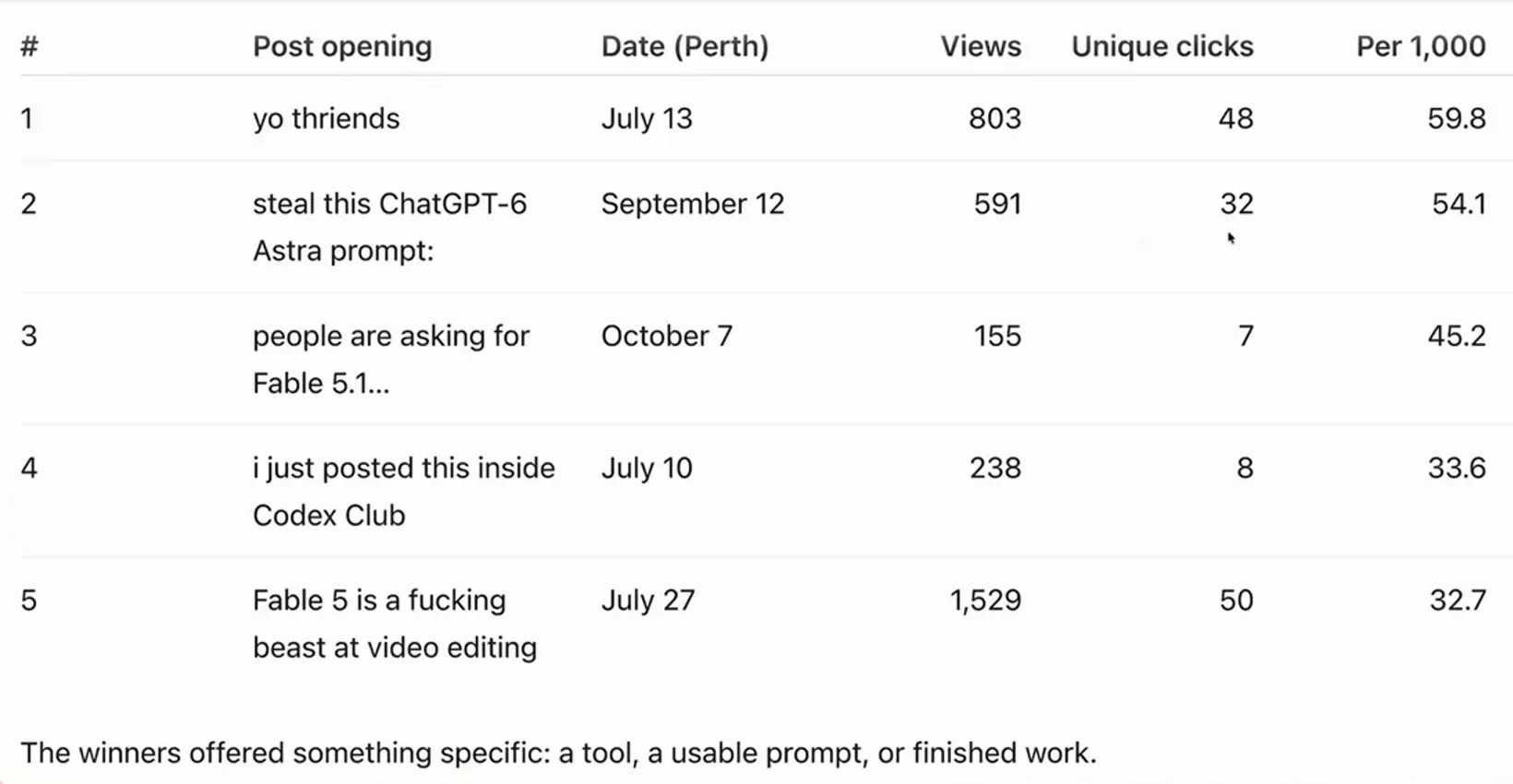
The ranked table of the top five posts, led by small posts: the top two had 803 and 591 views, plus the agent's one-line takeaway.
Step 4: Get three drafts built on hooks that already worked
You end up with three ready-to-go posts that follow the click pattern, each opening with a hook adapted from one of your past posts that got attention. Threadify writes the drafts. For each one the agent shows the time slot it picked, the hook it borrowed (and how many views that hook's post got) and the full draft in plain text.
In the example run, the second draft was set for Friday October 9 at 23:00. Its hook came from a post with 149,948 views, and the draft listed specific things to open: a prompt to use, a demo to watch, a tool to try.
The agent prepares the posts, auto plugs and times for your approval and schedules nothing before then. Read every draft and its call to action. When you're happy, reply:
yes
The agent then uses Threadify to schedule all three, so check they're all scheduled before you move on. In the example run, the agent reported all three posts scheduled and verified, one each for Thursday, Friday and Saturday. Times follow the time zone shown on your Agent tab, so make sure it's yours.
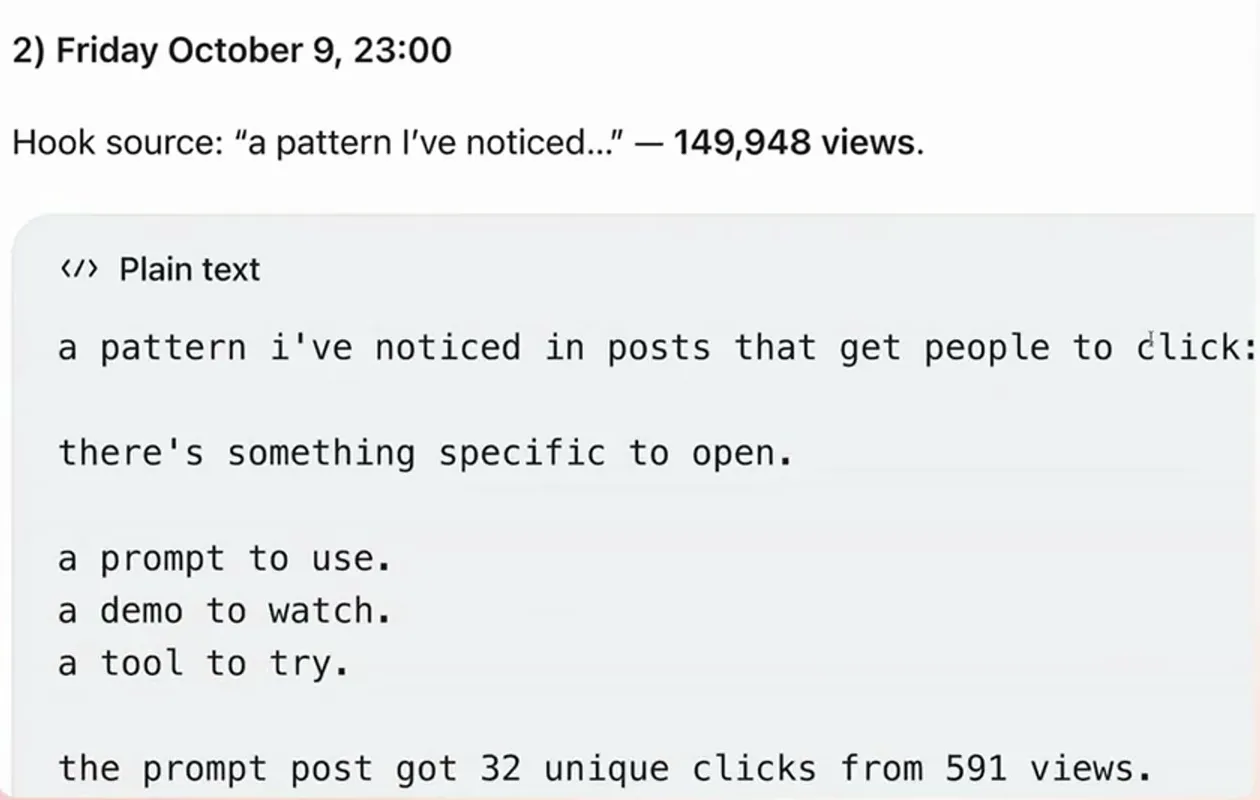
One of the three drafts, with its time slot, the hook source and that post's views, and the plain-text draft offering something specific to open.
Step 5: Connect your AI agent to Threadify (one-time setup)
This step lets your agent read your posts and schedule for you. Sign in to Threadify and connect your Threads account if you haven't yet. Then open the Agent tab at the top, scroll down to the setup instructions and pick your agent app.
For Claude, click Copy next to the link Threadify gives you. In Claude, go to Settings → Connectors → Add custom connector, name it Threadify, paste the link and click Allow when your browser opens. ChatGPT and Gemini have their own cards with their own steps.
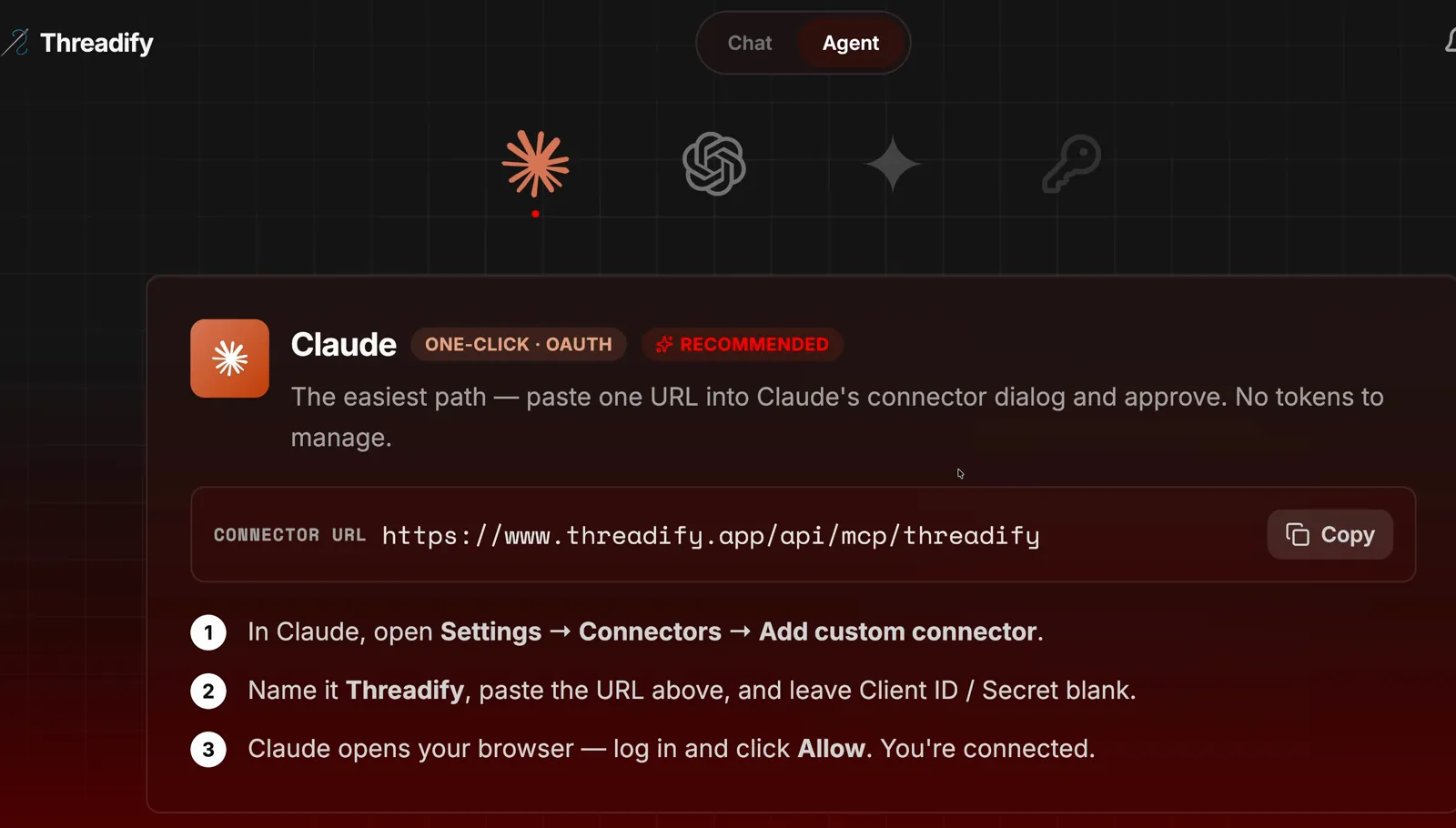
The Agent tab with a client card (Claude shown): one link to copy and three numbered steps. Pick the card for your own agent app.
Step 6: Install the free workflow with one message
This teaches your agent the Money Posts workflow and gets the rest of your setup done with you. Open a new chat in your agent app and type the message exactly as the screenshot shows: the free Threadify workflows link, followed by "install this, run the get set up workflow then the money posts workflow".
The get set up workflow walks you through getting Threadify ready, then the Money Posts workflow runs. After that, typing /money (Step 1) starts it whenever you want a fresh ranking.

A new agent chat with the free workflows link and the install request typed in, ready to send.
What a good first run looks like
When it works, you'll have a ranked table of your posts by clicks per 1,000 views, a one-line reason the winners win, and three drafted posts with their hooks, times and auto plugs waiting for your yes. Your numbers will be your own, and they won't look like the example run's. The ranking only reflects posts you've put links in. Treat it as a strong hint about what makes your audience click. The next three posts may not match it.
What if most of your Threads posts don't have a link?
The workflow ranks posts by clicks on tracked links, so a post without a link has nothing to count, however many views it got. In the example run, 13 of the 15 biggest posts from those 90 days carried no link at all. If that sounds like you, start adding a link or an auto plug to the posts that offer something, and run this again in a few weeks.
A few more honest limits:
- It learns from your own history. A brand-new account, or one with only a handful of linked posts, gives the agent very little to compare.
- Tracked links have a monthly allowance on each plan. Once you go past it, posts still publish, but their links go out as plain links, which won't be counted.
- You approve everything. The agent waits for your yes, but it's still your name on the post, so read each draft first.
- A click isn't a sale. This shows which posts send people to your offer. To check what happened after the click, or what to do with a post that got huge reach and no action, see what to do after a thread goes viral.
Find your next click-earning post this week
The post most likely to send people to your offer may already be sitting in your history, buried under the ones with bigger view counts. Open Threadify to connect your Threads account and your AI agent. Then type /money and let the ranking show you which pattern to write three more of.
Frequently Asked Questions
How do I calculate clicks per 1,000 views on Threads?+
Divide a post's clicks by its views, then multiply by 1,000. A post with 20 clicks from 102,000 views scores about 0.2, while one with 48 unique clicks from 803 views scores 59.8. You can do it by hand, or have your AI agent work it out for every post at once with the Money Posts workflow.
Does Threads show link clicks in its own insights?+
Threads insights compare a post's views with your usual numbers, but they don't show clicks. Threadify tracks links in your published posts automatically. Under Analytics, the Links & Leads tab shows clicks by post or by link.
Will the agent schedule posts without asking me?+
No. The agent prepares the three posts, their auto plugs and their times for your approval, and only uses Threadify to schedule them after you reply yes. Read each draft before you approve it.
Which AI agent apps can run the Money Posts workflow?+
You can connect Claude, ChatGPT (including Codex) or Gemini to Threadify from the Agent tab. Agent connections come with every paid plan.
Will the scheduled times be in my own time zone?+
Yes. Your agent schedules against the time zone shown on your Agent tab. Check it's correct before you approve the drafts, and change it there if you travel.
Try Threadify for free
Write better Threads in less time. Generate, refine, schedule—without the chaos.