
Turn a Pile of Threads Drafts Into a Week of Tracked Sales Posts
Hundreds of unposted Threads drafts, and views that never turn into sales? Your AI agent can pick the seven that fit your offer and schedule them, each with a tracked reply.

You post on Threads most days. Every so often a post takes off: the likes stack up, the comments keep coming, and for an afternoon it feels like it's finally working. Then you check your sales and nothing has moved. Nobody bought, because there was nothing to click.
Meanwhile your drafts folder keeps growing with hooks you saved at midnight, half-finished takes and posts you meant to come back to. There are hundreds of them, already in your voice, doing nothing. You still start every week from a blank page, and the post that's meant to sell something never gets written.
This guide is for creators who post a lot but aren't selling. Your AI agent reads your unposted drafts, picks the seven that best fit what you sell, and schedules them one a day for a week. Under each post, a reply with a tracked link goes out 50 minutes later, so the post does the talking and the reply makes the offer.
Why your Threads views don't turn into sales
A sales pitch at the top of a post turns something people wanted to read into an ad. A plug fixes that: it's a reply under your own post that carries one specific, relevant link to your offer. Your post stays worth reading, and the next step sits just below it for anyone who's interested. For the full case for selling in the reply, read Auto Plug vs manual CTA on Threads. This guide sets up a whole week of plugs at once.
What you need before you start
- A Threadify account with your Threads account connected.
- A paid Threadify plan. Every paid plan can connect an agent, and anything your agent does in Threadify draws on your plan's monthly credits.
- An AI agent you already use, such as Claude, ChatGPT or Gemini.
- Unposted drafts saved in Threadify. The more you have, the more the agent can choose from.
- An offer you want to sell, with a page you'd happily send people to.
- Some posting history, because the schedule is built from your own best times.
How to turn your Threads drafts into a week of sales posts (6 steps)
Step 1: Connect your AI agent to Threadify
Once your agent is connected, it can read your drafts and schedule posts for you. You only set this up once. In Threadify, open the Agent tab at the top, scroll down to the agent cards and choose yours: Claude, ChatGPT, Gemini or another agent. Each card walks you through the rest.
For Claude, click Copy on the Claude card. Then in Claude, go to Settings → Connectors → Add custom connector, name it Threadify, paste the link and leave Client ID / Secret blank. Claude opens your browser, where you log in and click Allow. For more detail, see how to connect Claude to Threads with Threadify.
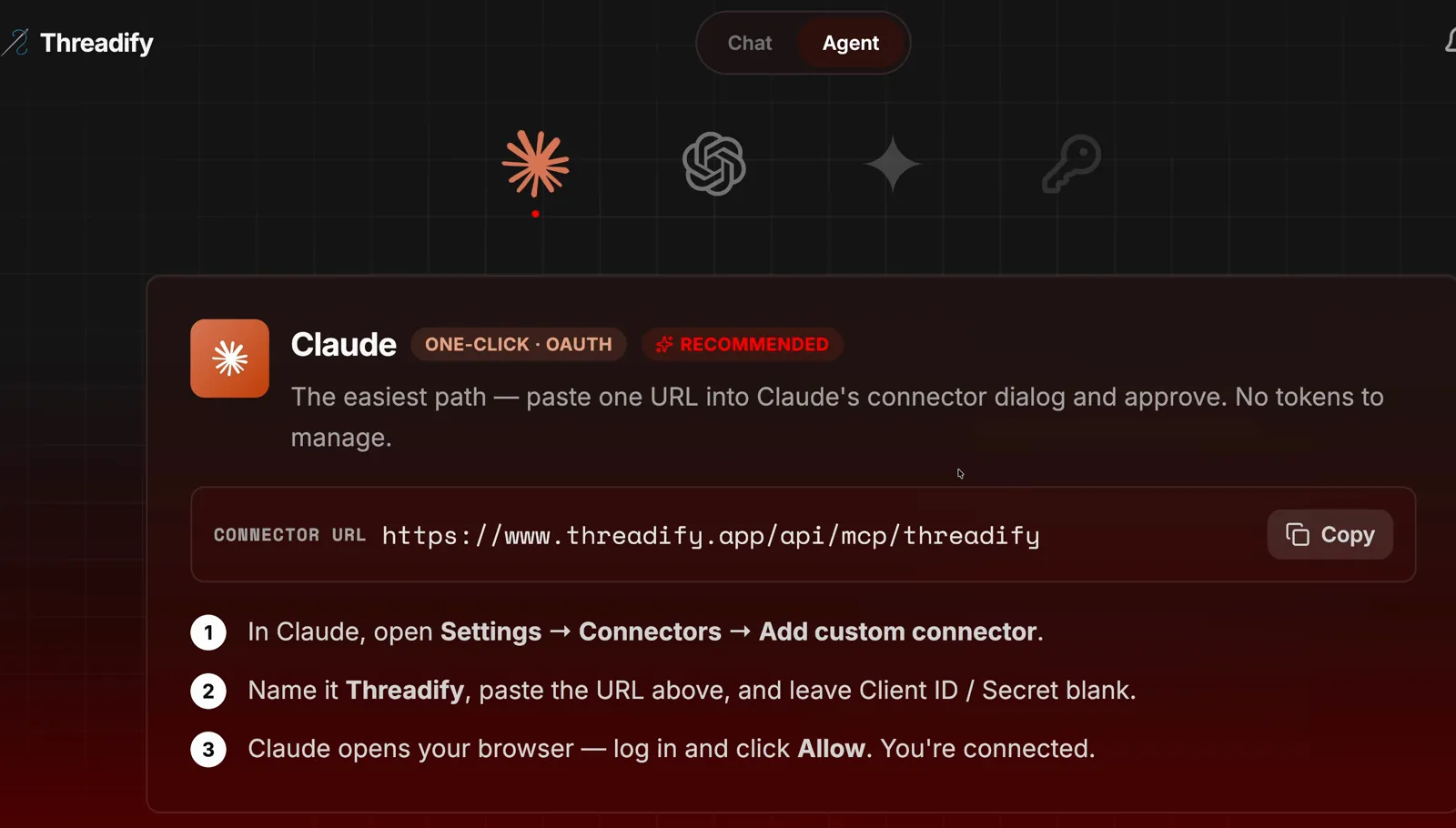
The Agent tab with the Claude card. Notice the Copy button and the three numbered setup steps underneath.
Step 2: Start Monetize my Week with one message
One message installs Threadify's free workflows and starts the one that builds your sales week. Open a new chat with your agent and type exactly what the screenshot below shows: the free workflows link, then "install this repo and run Monetize my Week" (a repo is just the online folder that holds the workflows; your agent installs it for you).

The whole request in the agent's message box: the free workflows link, followed by the instruction to install it and run Monetize my Week.
Step 3: See what your tracked links really earned last month
Before it picks a single post, the agent pulls real numbers from your account, so your week starts from what actually happened instead of a guess. It checks the last 30 days of your tracked links: how many links you used, their clicks and unique clicks, conversions and revenue, plus the five links with the most clicks.
Try Threadify for free
Write better Threads in less time. Generate, refine, schedule—without the chaos.
In the example run, the table showed 34 tracked links, 390 clicks, 330 unique clicks, 0 conversions and $0 revenue. People were clicking, but no sale showed up. Conversions only appear once Threadify can see your sales. On the Tracking tab, press Create receiver URL and paste it into your payment or email provider's webhook settings (the place where that provider lets you pass each new sale to another app). How to see which Threads posts lead to bookings or sales explains the rest.
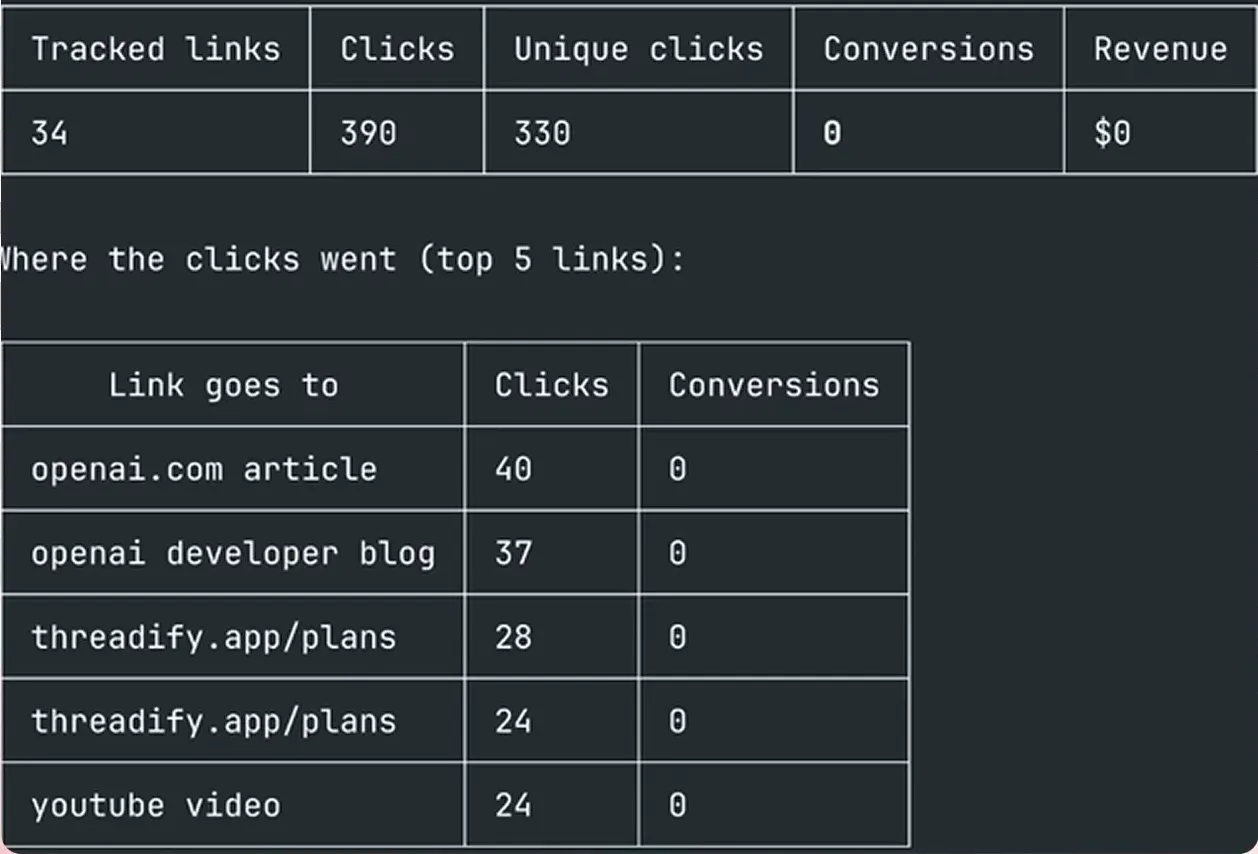
The agent's 30-day summary. Notice the clicks next to the 0 conversions and $0 revenue, and the top five links underneath.
Step 4: Get the seven drafts that fit your offer, without reading them yourself
Instead of you scrolling through hundreds of old drafts, the agent reads your unposted drafts and picks the seven that best fit your offer. In the example run, it found 1,061 unposted drafts, read 1,060 of them (1 would not load), left 1,053 out and selected 7. The reading took just over two minutes. The seven posts were reworked from the old drafts, and their original hooks were kept.
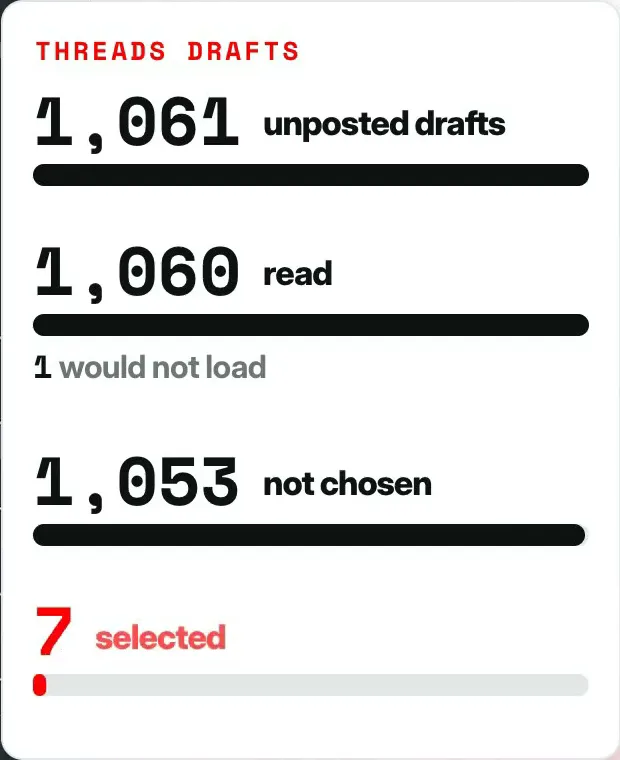
The draft count card: 1,061 unposted drafts, 1,060 read, 1 would not load, 1,053 not chosen and 7 selected.
Each post also gets a plug reply. In the example run the first plugs came back flat, so the agent was asked to have Threadify write them instead. If yours read as generic, send this:
Make sure you use Threadify to write the CTAs. Remember they need to be relevant, specific and seamlessly integrated. We want to have numbers and social proof as much as possible.
Read every rewritten plug before you move on. Your name is on each one, so check that every number and claim in it is true.
Step 5: Check that each post goes out at your best time
You get a ready-made week built from your own history, so you don't have to work out when to post. The agent proposes one post a day, with each plug landing 50 minutes after its post. In the example run, each time was that weekday's best measured slot over the last 90 days.
The example schedule ran from Fri 9 Oct to Thu 15 Oct, shown in Perth time. Some slots fell in the small hours, such as 12:30 am, because that's when the account's history said its posts did best. Your agent schedules against your local clock, and your times will follow your own posting history.
The 50-minute gap rests on the idea that Threads tests a new post in its first hour, so the link arrives near the end of that window.
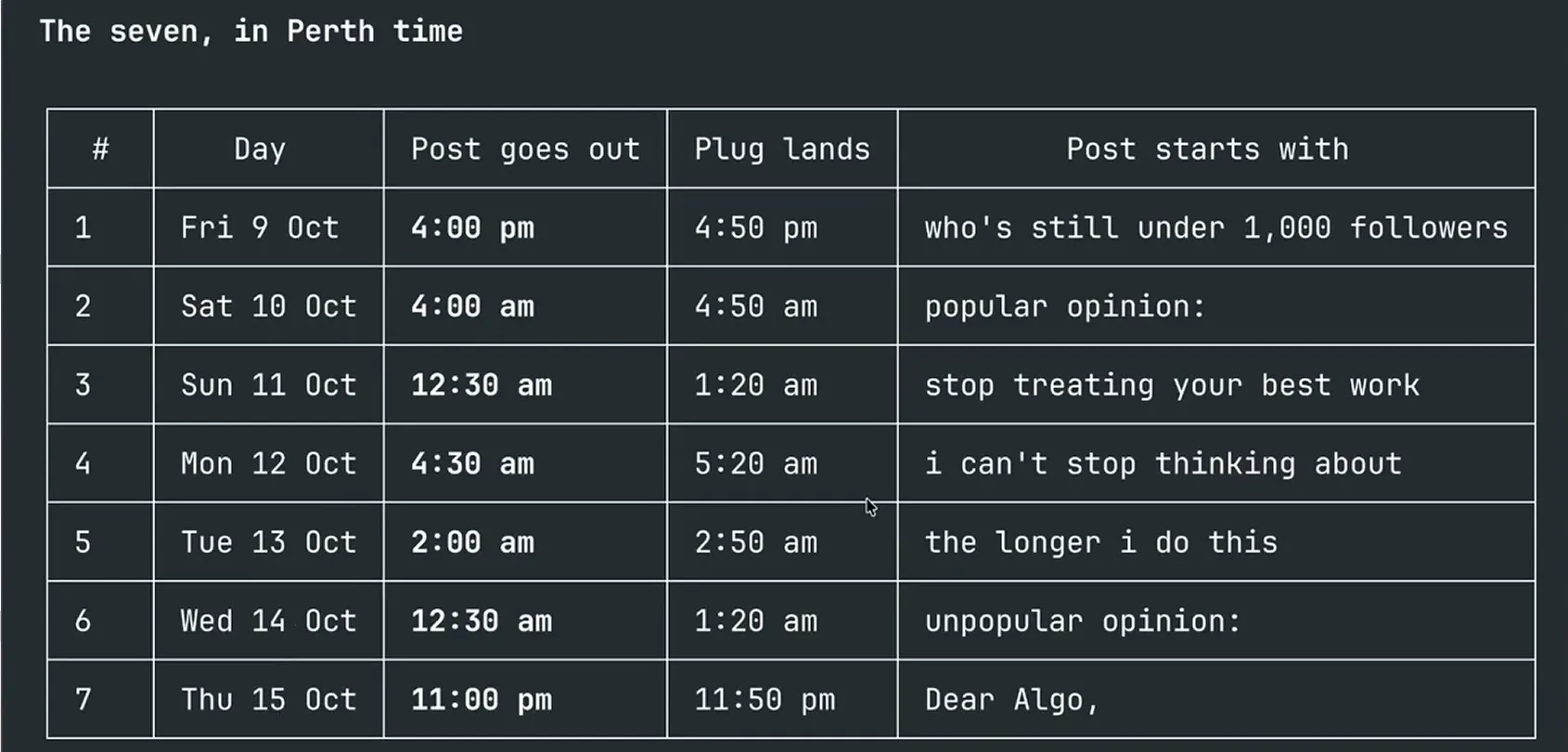
"The seven, in Perth time": one post a day from Fri 9 Oct to Thu 15 Oct. Notice the Plug lands column, 50 minutes after each post.
Step 6: Say yes and schedule all seven posts and plugs
In the example run, the agent showed the week first and scheduled it only after a yes. When you're happy with the week, reply:
yes
The agent schedules every post with its plug. In the example run, all seven went through with no failures, and each one came back with its post text and plug stored together. They're scheduled rather than posted, so they go out on the days you just checked.
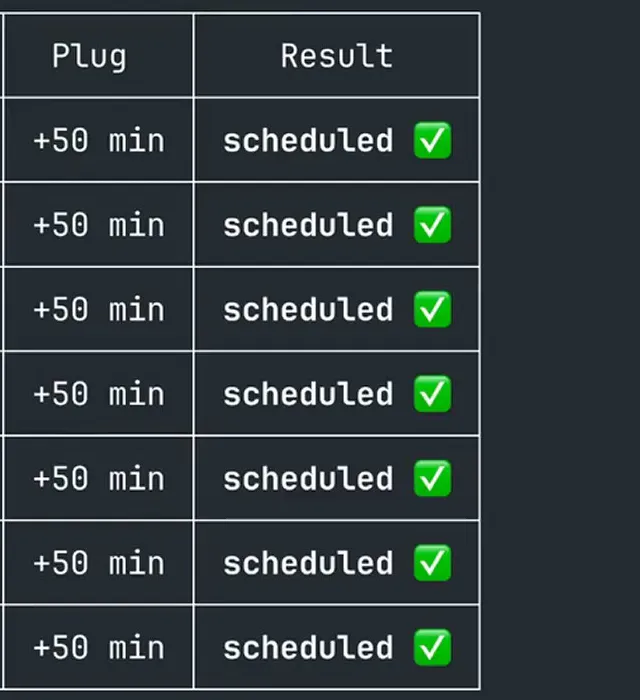
The result table. All seven rows show a +50 min plug and "scheduled" with a green tick.
What Threadify measures once your week goes out
You now have a week of posts from drafts you'd already written, each with a tracked plug underneath. As each post goes out, Threadify records whether it published, plus its views, interactions, total and unique clicks, conversions, conversion rate, sales and revenue. By the end of the week you'll see which posts got people to click and, once your sales are connected, which ones your sales are attributed to.
What to expect if you have fewer drafts or a smaller audience
- Your results will differ. The example account posts a lot and had more than a thousand drafts to choose from. With fewer drafts the agent has less to pick from, and a smaller audience means fewer people see each plug.
- The workflow sets up a week of sales posts, and only the results will show whether they sell. The example account had $0 revenue in its 30-day table, and the run shows the setup, not what the new week went on to sell.
- The first plugs in the example run were generic until Threadify rewrote them, so read the final version before you say yes.
- The schedule comes from your own past posts. If you've only posted a handful of times, the recommended slots won't mean much yet.
- Each plan has a monthly tracked-link limit (30 on Creator). Past it, links post as the plain URL, so check how many you've used before a busy week.
- No drafts yet? Start from your offer instead: turn your app or offer into seven scheduled Threads posts.
Turn your drafts into next week's sales posts
If your drafts folder is full, next week's sales posts may already be in it. Open Threadify, connect your agent from the Agent tab and ask it to run Monetize my Week. It picks the drafts that fit your offer, times them from your own history and puts a tracked plug under each one, so you can see which posts people click through from.
Frequently Asked Questions
Does the agent post anything without asking me first?+
Not in the example run. The agent showed the full week, with every post and plug time, and scheduled it only after a yes. Even then the posts were scheduled, not published straight away.
Can I use ChatGPT or Gemini instead of Claude?+
Yes. The Agent tab in Threadify has setup cards for Claude, ChatGPT, Gemini and other agents. Pick yours and follow the steps on its card.
Why put the sales link in a reply instead of the post?+
Your post stays something people want to read, and the reply gives anyone who's interested a clear next step. A pitch at the top of a post tends to read like an ad.
Do I need to write new posts for this?+
No. The workflow picks from unposted drafts already saved in Threadify. If you don't have any, start from your offer page instead and let your agent write seven new posts.
Does running the workflow use credits?+
Yes. Anything your agent does in Threadify draws on your plan's monthly credits, the same pool the rest of the app uses. Every paid plan can connect an agent.
Try Threadify for free
Write better Threads in less time. Generate, refine, schedule—without the chaos.